
User's Guide
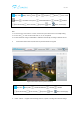
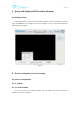
Table Of Contents

用户手册
Note:
1. You can view one or four video in a screen, need to set up the cameras in 5.1.1.5 multiple setting.
2. You can click to zoom in and out the video, 1x, 2x, 3x, 4x optional.
3. The first stream will change to 1920x1080 or 1280x720 automatically according to different camera.
If select“View Video- Mode 2”,It will enter into preview interface as Figure8
Figure 8(View Video- Mode 2 preview interface)
Notice: It doesn’t support manual listening, intercom, capture, recording and multi-view settings.
Stop video Play video 1920x1080/1280x720 640x360 320x180
Cruise Horizontally Cruise Vertically Stop Cruise Centre Return to Homepage
Stop video Play video Listen Ta l k Snapshot Record Zoom in/out
Multiview Show/Hide control panel 1920x1080/1280x720 640x360 320x180
Cruise Horizontally Cruise Vertically Stop Cruise Centre Return to Homepage