
Quick Start Guide




Tip: To download videos from a computer to the Player,
you need to install a smart phone management APP
which supports Android OS in your computer.
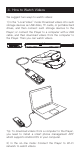
1) In the “Local Video” mode: Download videos into such
storage devices as USB disks, TF cards, or portable hard
drives, and then connect such storage devices to the
Player; or connect the Player to a computer with a USB
cable, and then download videos from the computer to
the Player. Then you can watch videos.
2)In the on-line mode: Connect the Player to Wi-Fi
network to watch videos.
We suggest two ways to watch videos:
4. How to Watch Videos