
User's Manual



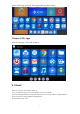


Table Of Contents
6
5.2 Browser
Move to “Browser”. Press OK to enter in.
It is a convenient way for you to go to your desired website.
Notice: Please go to the system setting to set the internet connection before entering
into the website.
5.3 Calculator
Move to “Calculator” icon. Press OK to enter in.
It is a simple Calculator for arithmetical workings.
5.4 PPPoE
Move to “PPPoE” icon. Press OK to enter in. You can configure PPPoE here. Few
people use this function.
5.5 Movie Player
Move “Movie Player”. Press OK to enter into the movie list.
5.6 Gallery
Move to “Gallery”. Press OK to enter into the picture list
Here you can enjoy the pictures
5.7 FileBrowser
Move to “File browser”. Press OK to enter into the device list.
When inserting with USB device or TF/SD cards, the sign ”Device is mounting ”will
be shown on the screen.
Here you can cut, copy, paste and move the files and folder between the local disk and
external storage card.
5.8 Music
Move to “Music”. Press OK to enter into the music list. This is for local media player.
Here you can enjoy beautiful music.
5.9 Media Center
Move to “Media center” icon,you can play all your prefer media here.