
User's Manual



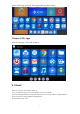


Table Of Contents

5
Please tick the apps you need. Tick it again when you don’t need it.
Chapter 5 My Apps
Move to “My Apps”, Press OK to enter in.
5.1 Email
Move to “Email”. Press OK to enter in.
It is a convenient way for you to send and receive you emails.
You can configure Email for most account in just a few steps. Move to Email address.
Press to input you email address and password.
And press the icon “next”.