
User's Manual




BASIC OPERATIONS
PAL-NTSC Selection
To set up The Multimedia player according to the connected TFT LCD monitor and video
signal system, to play a DVD or any other video discs, follow these guidelines:
If the TFT LCD monitor is NTSC, press the N/P button on The Multimedia
Player until you see NTSC on your screen.
If the TFT LCD monitor is PAL, select PAL by pressing the N/P button on the
Until you see PAL on your screen:
If the TFT LCD monitor supports both PAL and NTSC, select MULTI by Pressing
The
N/P button until you see MULTI on your screen.
Disc loading
Load one disc with the label side facing upwards and make sure you do not touch the
data side with your fingers.
Note:
Do not touch the content side of a disc
Do not stick any paper or stickers on the disc.
Do not force the disc into the player,Damage to
The disc or the player may occur of a disc is not
placed correctly on the guides in the disc tray.
Finger prints and dust on the disc surface can affect the sound and picture quality. Clean the
discs regularly with a soft cotton cloth from the disc center to the outside of the disc. Do not clean
in circular motions.
Do not use any solvent, such as diluting agents, gasoline, liquid detergent and etc; this may
cause serious damage to the disc.
Keep discs away from direct sunlight or any heat source
The Multimedia player is a precision device. If the optical pick-up lens and disc drive parts
become dirty or worn down, picture quality will become poor. To obtain a clear picture, regular
inspection and maintenance are recommended every 1,000 hours of use, depending on the
operating environment.
Once the disc is loaded, the unit will automatically start reading the disk and it will take
a few seconds to download the disc initial data, thereafter ,the disc type will be displayed
in the left upper corner of the LCD screen and the unit will start playing the disc.
Page 7 of 25 pages Page 18 of 25 pages
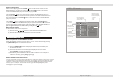
OSD - Photo CD mode
..
004_1
Repeat : Off
/PICTURES/007_4.JPG
W: 3008 H: 2000
05/37
005_2
006_3
007_4
008_5
009_6
010_7
Mode : Normal
Playback
status
Highlight
selection
(PressENTER
button to start
playback)
Disc File
current file
/ total files
Image rotation
Press CURSOR button to rotate a picture.
UP : rotate 180 anti-clockwise
LEFT : rotate 90 anti- clockwise
DOWN: rotate 180 clockwise
RIGHT :rotate 90 clockwise
Repeat mode
(Press ENTER
button to adjust)
Single
All
Off
SOURCE DOWN
MENU UP