
User's Manual




CONNECTION
Page 6 of 25 pages Page 19 of 25 pages
Language
Enter this menu to setup the OSD language ,
DVD disc subtitle,and DVD disc start menu.
Exit
Enter this menu to setup the video setting
Video
Exit
Language
Audio
Video
Rating
Misc
: 16:9
Aspect Ratio
: Multi
TV System
View mode : Auto Fit
Smart picture :Dynamic
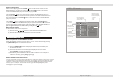
Video
SETUP MENU
Aspect Ration:
4:3/16:9
View mode:
Fill/original/Auto Fit/Pan scan
TV System:
NTSC/PAL/MULTI
Smart picture:
Standard/Bright/Sofe/Dynamic
Press [setup] button to enter DVD On Screen Display(OSD) setup menu.
Hightlight the desired icon and press [ENTER] button to activate the
setting sub menu.
Audio
Rating
Misc
: English
: OFF
: English
: English
Language
Subtitle
DIVX Subtitle
DVD menu
Language
Video
CONNECTING THE UNIT TO AN EXTERNAL DVD GAME USING THE A/V CABLE (NOT
INCLUDED)
DVD
GAME
Composite Video (YELLOW)
Right Audio (RED)
Left Audio (WHITE)
OUT