
User's Manual




PROGRAM SETTINGS
Page 13 of 25 pages Page 12 of 25 pages
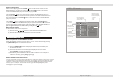
Hereafter there are also three levels to zoom-out, press the ZOOM button several times
to decrease the zoom factor in the following sequence:
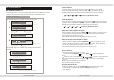
PROGRAM SETTING
DVD setting menu
Load a DVD disc.
Press [Program] button to enter the setup menu.
If you want to cancel program play, press the clear program icon,
all programs will be cleared.
Program to play a DVD disc in a desired sequence automatically.
Press UP or DOWN button to highlight the desired title and then press
[ENTER] button to enter chapter program.
Press PLAY icon and [ENTER] button to start the program play.
1
2
3
1 ---- ----
2 ---- ----
3 ---- ----
PLAY
Clea program
With the image zoomed, the( )arrow buttons will allow you to pan through the
zoomed images.
To return to normal screen size, press the [ZOOM] button for the 4th time.
Memory play
The multimedia player can memorize the last stop point and play from this point onwards
when the unit is switched on again or when play is pressed again.
when playing, press the [STOP] button once to stop playback. The multimedia player will
memorize the current position on the disc. press the [PLAY] button to start playing from
the last memorized position. Pressing [STOP] button twice will clear the memorized
position from the memory and if play is resumed, the disc will be played from the
beginning.
Slow Play
While playing, press [SLOW] to play video slowly at different speeds. This option can be
used to play the disc slow forward. Four speeds are available for the slow forwards option.
Press [SLOW] once, the speed decreases by one shift. Press [PLAY] to return to normal
state.