
User's Manual




Page 14 of 25 pages
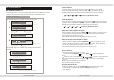
To check for example the remaining time when playing the 2nd song, press the DISPLAY
button. The screen shows TC . This is the current track played.
For CD discs
TC
T:04/10
00:03:08
TC
T:04/10
00:03:08
Page 11 of 25 pages
Press the DISPLAY button twice and the screen will show the remaining time for the
current track.
TR
T:04/10
00:03:08
TR
T:04/10
00:03:08
Press the DISPLAY button for a third time and the screen will show the elapsed time for
the current disc.
Press the DISPLAY button for a 4th time and the screen will show the elapsed time for
the current chapter.
CD/MPEG4/Picture CD program menu
Load a CD, MPEG3,MPEG4 or Picture CD disc to display the file manager menu.
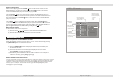
Press RIGHT cursor button to highlight the "Repeat" and press
1
Track01
Track02
Track03
Track04
Track05
Track06
Track07
Track08
JPEG Preview
04/17 /Track04.CDA
Repeat:OFF
Mode:Normal
Music playing
Stop
OFF SINGLE FOLDER ALL
X1
X2
X3
[ENTER] button to select from "OFF","SINGLE","FOLDER","ALL".