
User's Manual




Page 16 of 25 pages
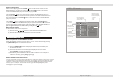
While the video is playing press the Fast Forward [ ] button on the remote
control to play the video in Fast Forward (FFWD) mode. Five different speeds are
available and depend on the number of times this button is pressed in sequence.
Fast Forward
2x 4x 8x 16x Normal play
(DVD&Other Discs)
While the video is playing press the Fast Backward button [ ]on the remote control
to play the video in Fast Backward (FRWD) mode. Four different speeds are available
and depend on the number of times this button is pressed in sequence.
Fast Backward
When a DVD disc is playing, press the NEXT [ ]button on either the remote control
or The to skip to the next chapter. When other discs are played,
press this button to skip to the next track.
Note: Whether this function works depends on the disc type in use.
Multimedia player
Skip to the next chapter or track
When a DVD disc is playing, press the PREVIOUS [ ]button on either the remote
control or The to skip to the previous chapter. When other discs
are played, press this button to skip to the previous track.
Note: Whether this function works depends on the disc type in use.
Multimedia player
Skip to the previous chapter or track
There are two options to select a next track.
1 Press either thePREVIOUS or the NEXT button as described
above.
Press one or more of the NUMBER 0 9, buttons to enter the desired
track number. When the screen is displaying a this function is not available.
easons:
A) The tracks on the disks are not numbered;
B) The entered number is incorrect;
Select a track
Display the track list
Page 9 of 25 pages
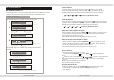
Press [Display] button, an On Screen Display (OSD) indicator will be displayed at the lower
middle part of the TV screen displaying the disc information and operation status.
ON SCREEN DISPLAY
OSD - DVD mode
Time 00:34:44/01:32:10
Title 1/4 Chapter 3/7
Playback time
Audio 1/2 5.1 Ch Chi
1
2
3
Disc Elapsed
/Disc Time
Chapter
current chapter
/ total chapters
Disc Title
current title
/ total disc titles
Multi-Audio
current audio track
/ total tracks
Audio format
5.1CH
2CH
Name of current
audio track
Subtitle 3/3 Eng
Angle 1/2
4
5
Disc Subtitle
current subtitle
/ total disc subtitles
Name of current
Subtitle
Multi-angle
current angle
/ total angles
Chapter 3/7
2
Chapter
current chapter
/ total chapters
ON SCREEN DISPLAY
Bitrate 4.410mbps
6
current bitrate
bitrate:The rate of information dissemination
2x 4x 8x 16x Normal play
(DVD&Other Discs)
while the DVD disc is playing, press[ MENU PBC] to display thetrack list. Select
a track with the up or down arrow and press [ENTER] to confirm your
track selection.
Press [Display] button once to display Time and Title information.
Press [Display] button twice to display Audio ,Subtitle, Angle,and Bitrate
information