
User's Manual




Pause / Stop / Play
When a disc is playing, press the PAUSE button on the remote control or on the
Multimedia player to pause the session. Press the PLAY button on the remote
control or the Multimedia player to resume playing the disc.
Press the STOP button once on the remote control or The Multimedia player to
stop playing a disc. The unit will memorize the position on the disk and will continue to
play from that position if thePLAY button on the remote control or The Multimedia
player is pressed.
Press STOP twice to completely stop playing a disc. When the PLAY button
on the remote control or the Multimedia player is pressed hereafter, the unit will not
resume play from the position the disc was interrupted at. Note: The Disc continues to
spin for approximately four(4) minutes after pressing the stop button.
Select menu items
In either the disc menu or the setup menu:
(1) Press the arrow / / / / buttons to move between selectable items.
(2) Press the PLAY button to confirm and/or execute a selection
When the DVD disc contains an on-disc menu, you can access this menuby pressing
the [MENU PBC] button on the Remote Control.
Select a specific on-disc Menu section
(1) Press the [MENU PBC] button to display the DVD menu (if available) and
the selection choices.
(2) Use the arrow buttons to scroll through the displayed sub-menu items.
Press [ENTER] to confirm the selection.
(3) Alternatively, use the Number buttons to make a selection. For example: To
select the 13th song, press[ 10/0],[1], then [3]
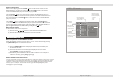
Audio CD discs track selection
Page 8 of 25 pages
ADVANCED OPERATION
Page 17 of 25 pages
Track01
Track02
Track03
Track04
Track05
Track06
Track07
Track08
04/17 /Track04.CDA
00:00:38/00:03:39
Music Playing
Repeat : Off
Mode : Normal
OSD - CD mode
Playback
status
Highlight
selection
(Press ENTER
button to start
playback)
Playback time
Track Elapsed
/Track time
Repeat mode
(Press ENTER
button to adjust)
Single
All
Off
Disc Track
current track
/ total tracks
You can select/play songs via the number buttons, If the track number is lower than 10,press
a number button 1-9 to select the desired track. For example: to select the 8th track, press
number 8.to select track number beyone10,first press[10/0],followed by the digit number
button(1-9).For example: To select the 12th song, press button[10/0],then press
button[1],then press button [2].