
XG-MB67X Operation-Manual Setup-Guide GB

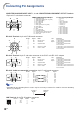
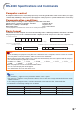
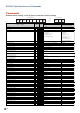


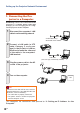

Table Of Contents
- Screen Size and Projection Distance
- Connecting Pin Assignments
- RS-232C Specifications and Commands
- Setting up the Projector Network Environment
- Controlling the Projector via LAN
- Controlling the Projector Using Internet Explorer (Version 5.0 or later)
- Confirming the Projector Status (Status)
- Controlling the Projector (Control)
- Setting and Adjusting the Projector (Settings & Adjustments)
- Setting the Security (Network – Security)
- Making General Settings for the Network (Network – General)
- Setting for Sending E-mail when an Error Occurs (Mail – Originator Settings)
- Setting Error Items and Destination Addresses to which E-mail is to be Sent when an Error Occurs (Mail – Recipient Settings)
- Setting the Projector Using RS-232C or Telnet
- Controlling the Projector Using RS-232C or Telnet
- View Setting Detail List ([V]View All Setting)
- Set Items
- Save Settings and Quit ([S]Save & Quit)
- Quit without Saving Settings ([Q]Quit Unchanged)
- IP Address Setting ([1]IP Address)
- Subnet Mask Setting ([2]Subnet Mask)
- Default Gateway Setting ([3]Default Gateway)
- User Name Setting ([4]User Name)
- Password Setting ([5]Password)
- RS-232C Baud Rate Setting ([6]RS-232C Baud Rate)
- Projector Name Setting ([7]Projector Name)
- Disconnecting All Connections ([D]Disconnect All)
- Entering ADVANCED SETUP MENU ([A]Advanced Setup)
- Setting Auto Logout Time (ADVANCED[1]Auto Logout Time)
- Data Port Setting (ADVANCED[2]Data Port)
- Carrying out Network Ping Test (ADVANCED[5]Network Ping Test)
- Setting of Accept IP Address (ADVANCED[6]Accept IP Addr(1) - [8]Accept IP Addr(3))
- Accepting All IP Addresses (ADVANCED[9]Accept All IP Addr)
- Setting of Search Port (ADVANCED[0]Search Port)
- Return to Default Settings (ADVANCED[!]Restore Default Setting)
- Return to Main Menu (ADVANCED[Q]Return to Main Menu)
- Troubleshooting
- Dimensions

-6
RS-232C Specifications and Commands
INPUT 4 Sharp (ⴑ30 – ⴐ30)
INPUT 4 CLR Temp *2
INPUT 4 Bright Boost (0 – 2)
INPUT 4 Progressive : 2D
INPUT 4 Progressive : 3D
INPUT 4 Progressive : Film Mode
Clock (ⴑ150 – ⴐ150)
Phase (ⴑ30 – ⴐ30)
H-Position (ⴑ150 – ⴐ150)
V-Position (ⴑ60 – ⴐ60)
Fine Sync Adjustment Reset
Auto Sync : Off
Auto Sync : On
Internal Speaker : Off
Internal Speaker : On
Image Shift (ⴑ96 – ⴐ96 )
OSD Display : Off
OSD Display : On
Video System Selection : AUTO
Video System Selection : PAL
Video System Selection : SECAM
Video System Selection : NTSC4.43
Video System Selection : NTSC3.58
Video System Selection : PAL_M
Video System Selection : PAL_N
Video System Selection : PAL-60
Background Selection : Logo
Background Selection : Blue
Background Selection : None
Lamp Setting : Bright
Lamp Setting : EcoⴐQuiet
Auto Search : Off
Auto Search : On
Auto Power Off : Off
Auto Power Off : On
Auto Keystone : Off
Auto Keystone : On
PRJ Mode : Reverse Off
PRJ Mode : Reverse On
PRJ Mode : Invert Off
PRJ Mode : Invert On
Language Selection : ENGLISH
Language Selection : DEUTSCH
Language Selection : ESPAÑOL
Language Selection : NEDERLANDS
Language Selection : FRANÇAIS
Language Selection : ITALIANO
Language Selection : SVENSKA
Language Selection :
Language Selection : PORTUGUÊS
Language Selection :
Language Selection :
Setup Guide : Off
Setup Guide : On
System Sound : Off
System Sound : On
RGB Horizontal Frequency Check
RGB Vertical Frequency Check
Fan Mode : Normal
Fan Mode : High
OK or ERR
OK or ERR
OK or ERR
OK or ERR
OK or ERR
OK or ERR
OK or ERR
OK or ERR
OK or ERR
OK or ERR
OK or ERR
OK or ERR
OK or ERR
OK or ERR
OK or ERR
OK or ERR
OK or ERR
OK or ERR
OK or ERR
OK or ERR
OK or ERR
OK or ERR
OK or ERR
OK or ERR
OK or ERR
OK or ERR
OK or ERR
OK or ERR
OK or ERR
OK or ERR
OK or ERR
OK or ERR
OK or ERR
OK or ERR
OK or ERR
OK or ERR
OK or ERR
OK or ERR
OK or ERR
OK or ERR
OK or ERR
OK or ERR
OK or ERR
OK or ERR
OK or ERR
OK or ERR
OK or ERR
OK or ERR
OK or ERR
OK or ERR
OK or ERR
OK or ERR
OK or ERR
OK or ERR
OK or ERR
OK or ERR
x10
-1
kHz (***.* or ERR)
Hz (***.* or ERR)
OK or ERR
OK or ERR
ERR
ERR
ERR
ERR
ERR
ERR
ERR
ERR
ERR
ERR
ERR
ERR
ERR
ERR
ERR
ERR
ERR
ERR
ERR
ERR
ERR
ERR
ERR
ERR
ERR
ERR
ERR
ERR
ERR
ERR
ERR
ERR
ERR
ERR
ERR
ERR
ERR
ERR
ERR
ERR
ERR
ERR
ERR
ERR
ERR
ERR
ERR
ERR
ERR
ERR
ERR
ERR
ERR
ERR
ERR
ERR
ERR
ERR
ERR
ERR
V
V
V
V
V
V
I
I
I
I
I
A
A
A
A
L
I
I
M
M
M
M
M
M
M
M
I
I
I
T
T
I
I
A
A
A
A
I
I
I
I
M
M
M
M
M
M
M
M
M
M
M
S
S
S
S
T
T
H
H
B
B
B
B
B
B
N
N
A
A
A
A
A
S
S
N
M
M
E
E
E
E
E
E
E
E
M
M
M
H
H
N
N
P
P
T
T
M
M
M
M
E
E
E
E
E
E
E
E
E
E
E
E
E
S
S
F
F
L
L
S
C
W
I
I
I
C
P
H
V
R
D
D
P
P
D
D
D
S
S
S
S
S
S
S
S
B
B
B
M
M
S
S
O
O
K
K
R
R
I
I
L
L
L
L
L
L
L
L
L
L
L
G
G
N
N
R
R
M
M
H
T
E
P
P
P
L
H
P
P
E
J
J
K
K
S
I
I
Y
Y
Y
Y
Y
Y
Y
Y
G
G
G
D
D
E
E
W
W
S
S
E
E
N
N
A
A
A
A
A
A
A
A
A
A
A
U
U
D
D
Q
Q
D
D
_
_
_
_
_
_
*
_
*
_
_
_
_
_
_
_
_
_
_
_
_
_
_
_
_
_
_
_
_
_
_
_
_
_
_
_
_
_
_
_
_
_
_
_
_
_
_
_
_
_
_
_
_
_
_
_
_
_
_
_
*
*
_
_
_
_
*
*
*
*
_
_
_
_
_
*
_
_
_
_
_
_
_
_
_
_
_
_
_
_
_
_
_
_
_
_
_
_
_
_
_
_
_
_
_
_
_
_
_
_
_
_
_
_
_
_
_
_
_
_
*
*
_
_
_
_
*
*
*
*
_
_
_
_
_
*
_
_
_
_
_
_
_
_
_
_
_
_
_
_
_
_
_
_
_
_
_
_
_
_
_
_
_
_
_
_
_
_
_
_
1
1
_
_
_
_
_
_
_
_
*
*
*
0
1
2
*
*
*
*
1
0
1
0
1
*
0
1
1
2
3
4
5
6
7
8
1
3
4
0
1
0
1
0
1
0
1
0
1
0
1
1
2
3
4
5
6
7
8
9
0
1
0
1
0
1
1
2
0
1
CONTROL CONTENTS
Power ON
Standby mode
(or 30-second startup time)
COMMAND PARAMETER
RETURN
PJLink
TM
Compliant:
This product conforms with the PJLink standard Class 1 and all Class 1 commands are implemented.
This product confirms with the PJLink standard specification version 1.00.