
XG-MB67X Operation-Manual Setup-Guide GB

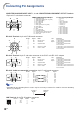
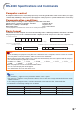
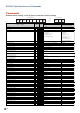


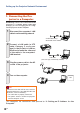

Table Of Contents
- Screen Size and Projection Distance
- Connecting Pin Assignments
- RS-232C Specifications and Commands
- Setting up the Projector Network Environment
- Controlling the Projector via LAN
- Controlling the Projector Using Internet Explorer (Version 5.0 or later)
- Confirming the Projector Status (Status)
- Controlling the Projector (Control)
- Setting and Adjusting the Projector (Settings & Adjustments)
- Setting the Security (Network – Security)
- Making General Settings for the Network (Network – General)
- Setting for Sending E-mail when an Error Occurs (Mail – Originator Settings)
- Setting Error Items and Destination Addresses to which E-mail is to be Sent when an Error Occurs (Mail – Recipient Settings)
- Setting the Projector Using RS-232C or Telnet
- Controlling the Projector Using RS-232C or Telnet
- View Setting Detail List ([V]View All Setting)
- Set Items
- Save Settings and Quit ([S]Save & Quit)
- Quit without Saving Settings ([Q]Quit Unchanged)
- IP Address Setting ([1]IP Address)
- Subnet Mask Setting ([2]Subnet Mask)
- Default Gateway Setting ([3]Default Gateway)
- User Name Setting ([4]User Name)
- Password Setting ([5]Password)
- RS-232C Baud Rate Setting ([6]RS-232C Baud Rate)
- Projector Name Setting ([7]Projector Name)
- Disconnecting All Connections ([D]Disconnect All)
- Entering ADVANCED SETUP MENU ([A]Advanced Setup)
- Setting Auto Logout Time (ADVANCED[1]Auto Logout Time)
- Data Port Setting (ADVANCED[2]Data Port)
- Carrying out Network Ping Test (ADVANCED[5]Network Ping Test)
- Setting of Accept IP Address (ADVANCED[6]Accept IP Addr(1) - [8]Accept IP Addr(3))
- Accepting All IP Addresses (ADVANCED[9]Accept All IP Addr)
- Setting of Search Port (ADVANCED[0]Search Port)
- Return to Default Settings (ADVANCED[!]Restore Default Setting)
- Return to Main Menu (ADVANCED[Q]Return to Main Menu)
- Troubleshooting
- Dimensions

-5
RS-232C Specifications and Commands
INPUT 1 Picture Mode : Presentation
INPUT 1 Picture Mode : Movie
INPUT 1 Picture Mode : Game
INPUT 1 Picture Mode : sRGB
INPUT 1 Contrast (ⴑ30 – ⴐ30)
INPUT 1 Bright (ⴑ30 – ⴐ30)
INPUT 1 Color (ⴑ30 – ⴐ30)
INPUT 1 Tint (ⴑ30 – ⴐ30)
INPUT 1 Red (ⴑ30 – ⴐ30)
INPUT 1 Blue (ⴑ30 – ⴐ30)
INPUT 1 Sharp (ⴑ30 – ⴐ30)
INPUT 1 CLR Temp *2
INPUT 1 Bright Boost (0 – 2)
INPUT 1 Progressive : 2D
INPUT 1 Progressive : 3D
INPUT 1 Progressive : Film Mode
INPUT 1 Signal Type : Auto
INPUT 1 Signal Type : RGB
INPUT 1 Signal Type : Component
INPUT 2 Picture Mode : Standard
INPUT 2 Picture Mode : Presentation
INPUT 2 Picture Mode : Movie
INPUT 2 Picture Mode : Game
INPUT 2 Picture Mode : sRGB
INPUT 2 Contrast (ⴑ30 – ⴐ30)
INPUT 2 Bright (ⴑ30 – ⴐ30)
INPUT 2 Color (ⴑ30 – ⴐ30)
INPUT 2 Tint (ⴑ30 – ⴐ30)
INPUT 2 Red (ⴑ30 – ⴐ30)
INPUT 2 Blue (ⴑ30 – ⴐ30)
INPUT 2 Sharp (ⴑ30 – ⴐ30)
INPUT 2 CLR Temp *2
INPUT 2 Bright Boost (0 – 2)
INPUT 2 Progressive : 2D
INPUT 2 Progressive : 3D
INPUT 2 Progressive : Film Mode
INPUT 2 Signal Type : Auto
INPUT 2 Signal Type : RGB
INPUT 2 Signal Type : Component
INPUT 3 Picture Mode : Standard
INPUT 3 Picture Mode : Presentation
INPUT 3 Picture Mode : Movie
INPUT 3 Picture Mode : Game
INPUT 3 Contrast (ⴑ30 – ⴐ30)
INPUT 3 Bright (ⴑ30 – ⴐ30)
INPUT 3 Color (ⴑ30 – ⴐ30)
INPUT 3 Tint (ⴑ30 – ⴐ30)
INPUT 3 Sharp (ⴑ30 – ⴐ30)
INPUT 3 CLR Temp *2
INPUT 3 Bright Boost (0 – 2)
INPUT 3 Progressive : 2D
INPUT 3 Progressive : 3D
INPUT 3 Progressive : Film Mode
INPUT 4 Picture Mode : Standard
INPUT 4 Picture Mode : Presentation
INPUT 4 Picture Mode : Movie
INPUT 4 Picture Mode : Game
INPUT 4 Contrast (ⴑ30 – ⴐ30)
INPUT 4 Bright (ⴑ30 – ⴐ30)
INPUT 4 Color (ⴑ30 – ⴐ30)
INPUT 4 Tint (ⴑ30 – ⴐ30)
OK or ERR
OK or ERR
OK or ERR
OK or ERR
OK or ERR
OK or ERR
OK or ERR
OK or ERR
OK or ERR
OK or ERR
OK or ERR
OK or ERR
OK or ERR
OK or ERR
OK or ERR
OK or ERR
OK or ERR
OK or ERR
OK or ERR
OK or ERR
OK or ERR
OK or ERR
OK or ERR
OK or ERR
OK or ERR
OK or ERR
OK or ERR
OK or ERR
OK or ERR
OK or ERR
OK or ERR
OK or ERR
OK or ERR
OK or ERR
OK or ERR
OK or ERR
OK or ERR
OK or ERR
OK or ERR
OK or ERR
OK or ERR
OK or ERR
OK or ERR
OK or ERR
OK or ERR
OK or ERR
OK or ERR
OK or ERR
OK or ERR
OK or ERR
OK or ERR
OK or ERR
OK or ERR
OK or ERR
OK or ERR
OK or ERR
OK or ERR
OK or ERR
OK or ERR
OK or ERR
OK or ERR
ERR
ERR
ERR
ERR
ERR
ERR
ERR
ERR
ERR
ERR
ERR
ERR
ERR
ERR
ERR
ERR
ERR
ERR
ERR
ERR
ERR
ERR
ERR
ERR
ERR
ERR
ERR
ERR
ERR
ERR
ERR
ERR
ERR
ERR
ERR
ERR
ERR
ERR
ERR
ERR
ERR
ERR
ERR
ERR
ERR
ERR
ERR
ERR
ERR
ERR
ERR
ERR
ERR
ERR
ERR
ERR
ERR
ERR
ERR
ERR
ERR
R
R
R
R
R
R
R
R
R
R
R
R
R
R
R
R
I
I
I
R
R
R
R
R
R
R
R
R
R
R
R
R
R
R
R
R
I
I
I
V
V
V
V
V
V
V
V
V
V
V
V
V
V
V
V
V
V
V
V
V
V
A
A
A
A
A
A
A
A
A
A
A
A
A
A
A
A
A
A
A
B
B
B
B
B
B
B
B
B
B
B
B
B
B
B
B
B
B
B
B
A
A
A
A
A
A
A
A
A
A
A
A
A
A
B
B
B
B
B
B
B
B
P
P
P
P
P
B
C
T
R
B
S
C
W
I
I
I
S
S
S
P
P
P
P
P
P
B
C
T
R
B
S
C
W
I
I
I
S
S
S
P
P
P
P
P
B
C
T
S
C
W
I
I
I
P
P
P
P
P
B
C
T
S
S
S
S
I
R
O
I
D
E
H
T
E
P
P
P
I
I
I
S
S
S
S
S
I
R
O
I
D
E
H
T
E
P
P
P
I
I
I
S
S
S
S
I
R
O
I
H
T
E
P
P
P
S
S
S
S
I
R
O
I
_
_
_
_
_
_
_
_
_
_
_
_
_
_
_
_
_
_
_
_
_
_
_
_
_
_
_
_
_
_
_
_
_
_
_
_
_
_
_
_
_
_
_
_
_
_
_
_
_
_
_
_
_
_
_
_
_
_
_
_
_
_
_
_
_
*
*
*
*
*
*
*
*
_
_
_
_
_
_
_
_
_
_
_
_
*
*
*
*
*
*
*
*
_
_
_
_
_
_
_
_
_
_
_
*
*
*
*
*
*
_
_
_
_
_
_
_
_
*
*
*
*
1
1
1
1
*
*
*
*
*
*
*
*
_
_
_
_
_
_
_
1
1
1
1
1
*
*
*
*
*
*
*
*
_
_
_
_
_
_
_
1
1
1
1
*
*
*
*
*
*
_
_
_
_
1
1
1
1
*
*
*
*
1
2
3
4
*
*
*
*
*
*
*
*
*
0
1
2
0
1
2
0
1
2
3
4
*
*
*
*
*
*
*
*
*
0
1
2
0
1
2
0
1
2
3
*
*
*
*
*
*
*
0
1
2
0
1
2
3
*
*
*
*
CONTROL CONTENTS
Power ON
Standby mode
(or 30-second startup time)
COMMAND PARAMETER
RETURN