
Operation Manual


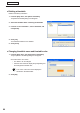


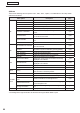
Table Of Contents
- Introduction
- Installing/Launching
- Setting Up a Server
- Launching
- Creating/Editing Programs
- The main Program Editor window
- Creating programs
- ● Valid content files
- ● Positioning content (Layout)
- ● Setting the background/frames 1-4
- ● Setting the scroll message
- ● Setting audio and music
- ● Setting the PIP window
- ● Saving a program
- ● Opening a program
- ● Checking a program
- ● Deleting a program
- ● Displaying program properties
- ● Importing/exporting a program
- Setting Information for logging in to the management PC
- Uploading/Downloading Programs, Content and Scroll Messages
- Deleting Programs, Content and Scroll Messages on the Server
- RSS Editor
- Conditional Content
- Creating/Editing Timetables
- Creating/Editing Schedules
- Logging In
- Panel Management
- Distributing
- Management
- User Management
- Viewer Update
- Schedule Reception/Program Display
- Key/Mouse Monitoring

83
Timetable Editor
3. Set the “Time”.
Thisisthetimethatthecommandwillbeexecuted.
Specifytimesbetween00:00and24:00.
4. Click [OK].
The panel control command will be registered in the timetable
and the control command icons (Turn On Display:
, Turn
Off Display:
, Switch Input Source: , TV: ) will be
displayed to the right of the timetable.
Commands may also be registered by dragging them from the “Command Name” to the
“Timetable”.
5. Repeat steps 2 to 4 as necessary and set all the panel control commands that you want to execute
over the course of the day.
● Adjusting a timetable
Clicking the buttons on the top right of the timetable performs the following actions:
Icon Menu option Description
Preview Program Displaysapreviewoftheselectedprogramatitsoriginalsize.
Preview Program
(FitScreen)
Displaysapreviewoftheselectedprogramfittedtothesizeofthe
screen.
Properties for Program/
Command
Displays the properties of the selected program/panel control command.
Delete Program/Command
Deletes the selected programs/panel control commands from the timetable.
Programs/panel control command may also be deleted by pressing [Delete].
Copy Programs/
Panel Control Commands
Copies the selected program/panel control command.
Paste Programs/
Panel Control Commands
Positions the copied program/panel control command into a timetable. If a
program in the timetable is selected, the copied program will be allocated
immediatelyafteritfinishes.Ifnoprogramsareselected,itwillbepastedat00:00.
Click a program or panel control command positioned on the
timetable to select it.
Dragaresizehandletoadjusttheplaybacktime/timeforthe
programorpanelcontrolcommandandconfirmthechanges
visually.
The program and the panel control command can be moved by
dragginganareaotherthantheresizehandleusingthemouse.