
Operation Manual

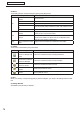


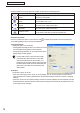

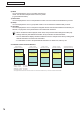


Table Of Contents
- Introduction
- Installing/Launching
- Setting Up a Server
- Launching
- Creating/Editing Programs
- The main Program Editor window
- Creating programs
- ● Valid content files
- ● Positioning content (Layout)
- ● Setting the background/frames 1-4
- ● Setting the scroll message
- ● Setting audio and music
- ● Setting the PIP window
- ● Saving a program
- ● Opening a program
- ● Checking a program
- ● Deleting a program
- ● Displaying program properties
- ● Importing/exporting a program
- Setting Information for logging in to the management PC
- Uploading/Downloading Programs, Content and Scroll Messages
- Deleting Programs, Content and Scroll Messages on the Server
- RSS Editor
- Conditional Content
- Creating/Editing Timetables
- Creating/Editing Schedules
- Logging In
- Panel Management
- Distributing
- Management
- User Management
- Viewer Update
- Schedule Reception/Program Display
- Key/Mouse Monitoring

78
Conditional Content Editor
6) Week
You can set playback to occur on a certain week of every
month. You can select multiple weeks out of every month
(e.g.firstandthirdweeks).
7) Panel name
You can set playback to occur on the panels that contain or do not contain the characters that you enter.
8) Group
You can set playback to occur in groups that contain or do not contain the characters that you enter.
9) Comment
Youcansetplaybacktooccuronthepanelconfiguredwiththecommentthatincludesthecharactersyou
entered, or to play back on the panels that do not include those characters.
•Whenconditionalcontentisplayed,Panelname,GroupandCommentsettingsfromwithinplay
settings reference panel attribute information set by the Viewer PC Client Scheduler.
•YoucandistributeanddisplayidenticalconditionalcontentonmultipleViewerPCsbysettingpanel
attribute information on Viewer PCs beforehand.
•ForinformationonhowtosetpanelattributeinformationonviewerPCs,refertop.153.
Conditional Content and Total Duration
Still Image (5 seconds)
Still Image (5 seconds)
Video (20 seconds)
Conditional Content
(20 seconds)
Still Image (5 seconds)
Still Image (5 seconds)
Video (20 seconds)
Monday’ s Content
(10 seconds)
Still Image (5 seconds)
Still Image (5 seconds)
Video (20 seconds)
Tuesday’ s Content
(15 seconds)
Still Image (5 seconds)
Still Image (5 seconds)
Video (20 seconds)
Wednesday’ s Content
(20 seconds)
Still Image (5 seconds)
Still Image (5 seconds)
Video (20 seconds)
Unconditional Content
(10 seconds)
Program Information
(Total Duration: 50 seconds)
The Program Editor will reflect the maximum duration from within the total duration when you close the Conditional Content Editor.
Monday’ s Content
Tuesday’ s Content
Wednesday’ s Content
Unconditional Content
10 seconds
15 seconds
20 seconds
10 seconds
Monday’ s Program
(Total Duration: 40 seconds)
Tuesday’ s Program
(Total Duration: 45 seconds)
Wednesday’ s Program
(Total Duration: 50 seconds)
Other Programs (Not M-T-W)
(Total Duration: 40 seconds)