
Operation Manual



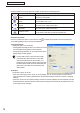



Table Of Contents
- Introduction
- Installing/Launching
- Setting Up a Server
- Launching
- Creating/Editing Programs
- The main Program Editor window
- Creating programs
- ● Valid content files
- ● Positioning content (Layout)
- ● Setting the background/frames 1-4
- ● Setting the scroll message
- ● Setting audio and music
- ● Setting the PIP window
- ● Saving a program
- ● Opening a program
- ● Checking a program
- ● Deleting a program
- ● Displaying program properties
- ● Importing/exporting a program
- Setting Information for logging in to the management PC
- Uploading/Downloading Programs, Content and Scroll Messages
- Deleting Programs, Content and Scroll Messages on the Server
- RSS Editor
- Conditional Content
- Creating/Editing Timetables
- Creating/Editing Schedules
- Logging In
- Panel Management
- Distributing
- Management
- User Management
- Viewer Update
- Schedule Reception/Program Display
- Key/Mouse Monitoring

77
Conditional Content Editor
3) Background
Ifthecontentisastillimagefileandyouhavecheckedthe“Keepingaspectratio”optionbutton,youcan
specify a background color for the content.
Clickthecolorswatchtodisplaythe[Color]dialogboxandchangethebackgroundcolor.
Clicktheboxnextto“Transparent”tomakethebackgroundtransparent.
The background color for the background frame will be displayed as black if the background color
is set to transparent.
4) Volume Control
The volume can be set.
5) Layout
•“Keepingaspectratio”/“Notkeepingaspectratio”/and“Inoriginalsize”optionbuttons
Youcanselect“Notkeepingaspectratio”whenthecontenttypeisastillimageorFlash.
Youcanselect“Inoriginalsize”whenthecontenttypeisastillimage.
•“Temporarily,moveframe”checkbox
Tochangethescreenpositionofthecontenttemporarily,checkthisboxandclick[PositionSetting].The
positionandsizeoftheframecanbespecifiedforeachcontent.
6) Picture Transition
When the content type is still image, the effect at screen switching can be set.
Select the effect from each pull-down menu.
Ifyoucheckthe“Viabackground”checkbox,theeffectofdisplayingthebackgroundcoloratthetimeof
screen switching is added.
7) Parameters (for EXE le)
DisplaysparametersforEXEfiles.
Play Condition Setting
Fromtheconditionslist,selectacontentfileandclick
todisplaythe[PropertiesofContent]dialogbox.
Selectfilesfromthelistandright-clickthem.Thedisplaywillremainvisibleevenwhen[SetPlayCondition]is
selected.
Thefollowingsettingsmaybecheckedandadjusted.
If you have set multiple conditions, the playlist will play when
it matches all conditions.
1) Condition Name
You can set the playback condition name
2) Term
You can set the beginning and end dates.
3) Time
You can set the beginning and end times.
4) Date
You can set the playback date.
5) Day
You can set the day of the week for playback.
You can select multiple days of the week (e.g. Sunday-
Monday).