
Operation Manual

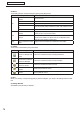


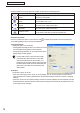

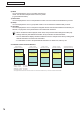


Table Of Contents
- Introduction
- Installing/Launching
- Setting Up a Server
- Launching
- Creating/Editing Programs
- The main Program Editor window
- Creating programs
- ● Valid content files
- ● Positioning content (Layout)
- ● Setting the background/frames 1-4
- ● Setting the scroll message
- ● Setting audio and music
- ● Setting the PIP window
- ● Saving a program
- ● Opening a program
- ● Checking a program
- ● Deleting a program
- ● Displaying program properties
- ● Importing/exporting a program
- Setting Information for logging in to the management PC
- Uploading/Downloading Programs, Content and Scroll Messages
- Deleting Programs, Content and Scroll Messages on the Server
- RSS Editor
- Conditional Content
- Creating/Editing Timetables
- Creating/Editing Schedules
- Logging In
- Panel Management
- Distributing
- Management
- User Management
- Viewer Update
- Schedule Reception/Program Display
- Key/Mouse Monitoring

76
Conditional Content Editor
Clicking the buttons on the top right of a condition list performs the following actions:
Icon Menu option Description
Show the properties of the
content
Displays the properties of the currently selected content le.
See below for more details.
Set the condition to play the
content
Sets playback conditions for selected content.
For more details, refer to
p.77.
Move the content to
upwards
Moves the selected content le one place forward (up) on the list.
(You cannot move multiple content les.)
Move the content to
downwards
Moves the selected content le one place backward (down) on the list.
(You cannot move multiple content les.)
Delete the content
Deletes the selected content les from the conditions list.
You can delete content les by pressing the [Delete] key.
Properties of content
From the condition list, select a content le, and click
to display the [Properties of Content] dialog box.
The following settings may be checked and adjusted:
1) Content File Path
Displays the path to the content le.
• Clicking [Attached Files] will allow you to add a le or les
from the [Attached Files] dialog box that appears.
• Clicking [Change] will allow you to change the le via the
[Open] dialog box that appears.
If using HTML content, make sure that images,
movies and other les referred to in the HTML
code are transferred to the same location, or a
subdirectory of the same location, where the HTML
le itself is stored. Make sure that all attached les
referenced in the HTML le are dened by their
relative paths.
2) Duration
The duration of play can be set.
• When the content type is video, audio, or scroll message, you can set the operation to be performed
when playback of the content is nished before the specied duration is reached. To set this, click [Play
Setting].
• When the “Scroll to the end of this message” check box is cleared, playback of scroll message is forcibly
terminated after the specied duration is reached even if playback is not nished yet (effective when the
content type is scroll message).