
Operation Manual

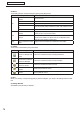


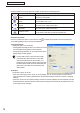

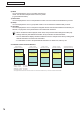


Table Of Contents
- Introduction
- Installing/Launching
- Setting Up a Server
- Launching
- Creating/Editing Programs
- The main Program Editor window
- Creating programs
- ● Valid content files
- ● Positioning content (Layout)
- ● Setting the background/frames 1-4
- ● Setting the scroll message
- ● Setting audio and music
- ● Setting the PIP window
- ● Saving a program
- ● Opening a program
- ● Checking a program
- ● Deleting a program
- ● Displaying program properties
- ● Importing/exporting a program
- Setting Information for logging in to the management PC
- Uploading/Downloading Programs, Content and Scroll Messages
- Deleting Programs, Content and Scroll Messages on the Server
- RSS Editor
- Conditional Content
- Creating/Editing Timetables
- Creating/Editing Schedules
- Logging In
- Panel Management
- Distributing
- Management
- User Management
- Viewer Update
- Schedule Reception/Program Display
- Key/Mouse Monitoring

72
Conditional Content Editor
2) Menus
Thefollowingarethecontentsofthe[File],[View],and[Help]menus.
Menu option Description
File
Create New Conditional
Content
Opensanewfile.
Open Conditional Content Reads saved conditional content.
Save Conditional Content Saves the currently edited conditional content.
Save Conditional Content
As
Saves the currently edited conditional content under a different name.
Exit Quits Conditional Content Editor.
View
Show Content Preview
Window
Displays a preview of the currently edited conditional content in a
windowthesizeofthepreviewwindow.
Refresh
Updatescontentfromthecontentfoldersintheeventthatcontent
fileshavebeenaddedtoordeletedfromtheConditionalContent
Foldersincethissoftwarewaslaunched.
Help
About Conditional Content
Editor
Displays version information for Conditional Content Editor.
3) Toolbar
The function of each button (icon) is as follows.
Icon Menu option Description
Create New Conditional
Content for Background/
Frame
Creates new conditional content for background/frames.
Create New Conditional
Content for Message
Creates new conditional content for scroll messages.
Create New Conditional
Content for Sound
Creates new conditional content for sound.
Open Conditional
Content
Reads saved conditional content.
Save Conditional
Content
Saves conditional content.
4) Tabs
Whenyouclickanyofthe[Content],[URL]or[ViewerPath]tabs,youwillgotothesettingwindowforthat
tab.
5) Settings Window
Set details for the tab that you selected.