
Operation Manual
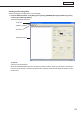


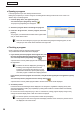


Table Of Contents
- Introduction
- Installing/Launching
- Setting Up a Server
- Launching
- Creating/Editing Programs
- The main Program Editor window
- Creating programs
- ● Valid content files
- ● Positioning content (Layout)
- ● Setting the background/frames 1-4
- ● Setting the scroll message
- ● Setting audio and music
- ● Setting the PIP window
- ● Saving a program
- ● Opening a program
- ● Checking a program
- ● Deleting a program
- ● Displaying program properties
- ● Importing/exporting a program
- Setting Information for logging in to the management PC
- Uploading/Downloading Programs, Content and Scroll Messages
- Deleting Programs, Content and Scroll Messages on the Server
- RSS Editor
- Conditional Content
- Creating/Editing Timetables
- Creating/Editing Schedules
- Logging In
- Panel Management
- Distributing
- Management
- User Management
- Viewer Update
- Schedule Reception/Program Display
- Key/Mouse Monitoring

57
Program Editor
Save program as
Usethisoptionwhenyouwanttosavethecurrentlyeditedprogramunderadifferentname.
1. From the [File] menu, click [Save Program As].
The[SaveProgramAs]dialogboxwillappear.
2. Select the program folder in which the program is to be
saved.
Formoredetailsabouttheprogramfolder,seethefollowing.
3. Enter a new name in “Program Name” and click [Save].
Aconfirmationmessageforcreatingathumbnailwillappear.
4. When you want to create a thumbnail, click [Yes].
When you do not want to create a thumbnail, click [No].
When you click [Yes], a small program preview for creating a thumbnail
will appear. Do not perform any operation before this preview screen
disappears.
Formoredetailsabouttheprogramthumbnail,seethefollowing.
If you have already created a thumbnail, the program thumbnail is not deleted even if you click
[No]. The previous thumbnail is displayed.
Program thumbnails
When a program thumbnail is created, it is displayed in the
[Open Program], [Save Program As], [Delete Program], [Import
Program],and[ExportProgram]dialogboxesandthe[Program]
tab of the timetable editor.
•Therearecasesinwhichavideoisnotdisplayed.
•IfthePIPfunctionisused,thePIPportionisnot
displayed.
Program Folder
•Programscanbesavedindifferentprogramfoldersaccording
to the type of program.
•Theprogramsintheselectedprogramfolderaredisplayedin
“ProgramListofSelectedProgramFolder.”
•
In the menu that appears when right-clicking the program storage folder, the following operation can be performed.
•Insert:
Adds a new program folder under the selected folder.
Enteranewnameinthe[ProgramFolderName]
dialogboxandclick[OK].
•Delete: Deletestheselectedfolder.Iftheselectedfolder
contains a program, it cannot be deleted.
•Rename:Changesthenameoftheselectedfolder.Enteranewnameinthe[ProgramFolderName]dialog
boxandclick[OK].
•The“Programs”folderinthefirstlevelcannotbedeletedorrenamed.
•Iftheselectedfoldercontainsaprogram,itcannotbedeleted.
•Bydragginganddroppingthefolder,thelocationofthefoldercanbechanged.
•Bydragginganddroppingaprogramin“ProgramListofSelectedProgramFolder”toanotherfolder,the
program can be moved.