
Operation Manual
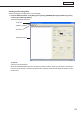




Table Of Contents
- Introduction
- Installing/Launching
- Setting Up a Server
- Launching
- Creating/Editing Programs
- The main Program Editor window
- Creating programs
- ● Valid content files
- ● Positioning content (Layout)
- ● Setting the background/frames 1-4
- ● Setting the scroll message
- ● Setting audio and music
- ● Setting the PIP window
- ● Saving a program
- ● Opening a program
- ● Checking a program
- ● Deleting a program
- ● Displaying program properties
- ● Importing/exporting a program
- Setting Information for logging in to the management PC
- Uploading/Downloading Programs, Content and Scroll Messages
- Deleting Programs, Content and Scroll Messages on the Server
- RSS Editor
- Conditional Content
- Creating/Editing Timetables
- Creating/Editing Schedules
- Logging In
- Panel Management
- Distributing
- Management
- User Management
- Viewer Update
- Schedule Reception/Program Display
- Key/Mouse Monitoring

51
Program Editor
Creating scroll message les
Create a message to be displayed in a scroll message.
1. From the Widows Taskbar, click [Start], [All Programs], [SHARP Digital Signage Software], [Tools],
and then [Scroll Message Editor].
Scroll Message Editor will launch.
1) Title bar
Afilenamewillbedisplayed.
WhenScrollMessageEditorlaunches,thetitlebarwillread“Untitled”.Whenafileissaved,itwillchangeto
thenameofthefile.Whencontentofanopenedfileischanged,thetitlebarwilldisplayanasterisk(*)after
thefilename.
1) Title bar
2) Menus
3)Toolbar
4) Settings window