
Operation Manual

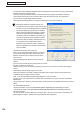
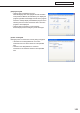

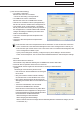


Table Of Contents
- Introduction
- Installing/Launching
- Setting Up a Server
- Launching
- Creating/Editing Programs
- The main Program Editor window
- Creating programs
- ● Valid content files
- ● Positioning content (Layout)
- ● Setting the background/frames 1-4
- ● Setting the scroll message
- ● Setting audio and music
- ● Setting the PIP window
- ● Saving a program
- ● Opening a program
- ● Checking a program
- ● Deleting a program
- ● Displaying program properties
- ● Importing/exporting a program
- Setting Information for logging in to the management PC
- Uploading/Downloading Programs, Content and Scroll Messages
- Deleting Programs, Content and Scroll Messages on the Server
- RSS Editor
- Conditional Content
- Creating/Editing Timetables
- Creating/Editing Schedules
- Logging In
- Panel Management
- Distributing
- Management
- User Management
- Viewer Update
- Schedule Reception/Program Display
- Key/Mouse Monitoring

153
FTP Server/Client Scheduler
[Display Area] tab
• “Displayareafordistributedprogram”
When the display area of the program and the resolution
of the panel are different, this tab allows you to display the
program regardless of the display area set for the program.
Check the “Always display the distributed program in the
followingarea”checkboxandsettheareainwhichthe
program is to be displayed.
• “Displayareaforemergencyscrollmessage”
Set the display area for emergency scroll messages.
[Power Control] tab
ManagespoweronviewerPCscurrentlybeingconfigured.
• “Shutdownonthedesignatedtime”checkbox
CheckthisboxtoturnofftheviewerPCatthespecified
time.
• “Rebootonthedesignatedtime”checkbox
CheckthisboxtorestarttheviewerPCatthespecified
time.