
Operation Manual


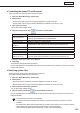
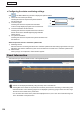


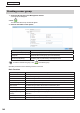
Table Of Contents
- Introduction
- Installing/Launching
- Setting Up a Server
- Launching
- Creating/Editing Programs
- The main Program Editor window
- Creating programs
- ● Valid content files
- ● Positioning content (Layout)
- ● Setting the background/frames 1-4
- ● Setting the scroll message
- ● Setting audio and music
- ● Setting the PIP window
- ● Saving a program
- ● Opening a program
- ● Checking a program
- ● Deleting a program
- ● Displaying program properties
- ● Importing/exporting a program
- Setting Information for logging in to the management PC
- Uploading/Downloading Programs, Content and Scroll Messages
- Deleting Programs, Content and Scroll Messages on the Server
- RSS Editor
- Conditional Content
- Creating/Editing Timetables
- Creating/Editing Schedules
- Logging In
- Panel Management
- Distributing
- Management
- User Management
- Viewer Update
- Schedule Reception/Program Display
- Key/Mouse Monitoring

140
Creating a user group
1. Click [User Group] in the User Management window.
A user group list will appear.
2. Click
.
The Add New User Group window will appear.
3. Enter the information in the options.
Menu option Explanation
User Group Name (Compulsory) Name of a group. (1 to 50 characters)
Description Comment about a user group. (up to 100 characters)
Functions (Compulsory)
Sets whether or not to permit operations, such as distribution and status
monitoring, that are performed by accessing the server.
To edit the created user group, click
and edit the group.
Operation permission for the following functions can be set.
Basic Functions
Menu option Explanation
All Permits operation for all functions.
Scheduled Distribution This button lets you assign a schedule to a panel and execute distribution.
Distribution Status This button lets you check the schedule distribution status.
Panel Status This button lets you retrieve the schedule that has been distributed to a panel.
Status Monitoring This button lets you check the panel status.
Status Control This button lets you send a status control command to a panel.
Panel Info This button lets you view the panel list window.
Break-In Program This button lets you assign a break-in program to a panel and execute distribution.
Emergency Scrolling
Message
This button lets you assign an emergency scroll message to a panel and execute
distribution.
Viewer Update This button lets you change the settings of the viewer PC.
System Log This button lets you browse the operation history information of the system log.
User Management