
Operation Manual


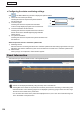
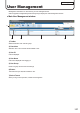


Table Of Contents
- Introduction
- Installing/Launching
- Setting Up a Server
- Launching
- Creating/Editing Programs
- The main Program Editor window
- Creating programs
- ● Valid content files
- ● Positioning content (Layout)
- ● Setting the background/frames 1-4
- ● Setting the scroll message
- ● Setting audio and music
- ● Setting the PIP window
- ● Saving a program
- ● Opening a program
- ● Checking a program
- ● Deleting a program
- ● Displaying program properties
- ● Importing/exporting a program
- Setting Information for logging in to the management PC
- Uploading/Downloading Programs, Content and Scroll Messages
- Deleting Programs, Content and Scroll Messages on the Server
- RSS Editor
- Conditional Content
- Creating/Editing Timetables
- Creating/Editing Schedules
- Logging In
- Panel Management
- Distributing
- Management
- User Management
- Viewer Update
- Schedule Reception/Program Display
- Key/Mouse Monitoring

137
User Management
User Management
Manages the information on users who log in to the management PC.
Click the [System Conguration] tab and then [User] to display the User Management window.
● Main User Management window
2) 3) 4) 5)
1)
6)
7)
1) Toolbar
Switches between user and user group.
2) Check box
Selects a user. This is used to edit and delete a user.
3) User ID
User ID displayed.
4) User Name
User name displayed when logging in.
5) User Group
Name of a group to which the user belongs.
6) Button
This button lets you add, edit or delete a user.
7) Select Tenant
When you log in as a supervisor, “Select Tenant” appears.