
Operation Manual


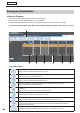


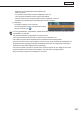


Table Of Contents
- Introduction
- Installing/Launching
- Setting Up a Server
- Launching
- Creating/Editing Programs
- The main Program Editor window
- Creating programs
- ● Valid content files
- ● Positioning content (Layout)
- ● Setting the background/frames 1-4
- ● Setting the scroll message
- ● Setting audio and music
- ● Setting the PIP window
- ● Saving a program
- ● Opening a program
- ● Checking a program
- ● Deleting a program
- ● Displaying program properties
- ● Importing/exporting a program
- Setting Information for logging in to the management PC
- Uploading/Downloading Programs, Content and Scroll Messages
- Deleting Programs, Content and Scroll Messages on the Server
- RSS Editor
- Conditional Content
- Creating/Editing Timetables
- Creating/Editing Schedules
- Logging In
- Panel Management
- Distributing
- Management
- User Management
- Viewer Update
- Schedule Reception/Program Display
- Key/Mouse Monitoring

128
Emergency Scroll Message
This button lets you distribute scroll message for emergencies.
It also lets you check the distribution status of such messages.
* Change the settings in Show / Hide Menu Tabs so that the “Emergency Scroll Message” tab is shown.
(
+p.105)
To stop displaying a scroll message in the middle, send a stop command for scroll message. (+p.130)
2)
1)
3) 4) 5) 6)
7)
1) Operation toolbar
Assigns an emergency scroll message (or a stop command for scroll message) to a panel.
Select a panel to assign and click this icon. (+p.130)
Reverts to the state before a scroll message (or a stop command) was assigned.
Select a panel to revert and click this icon.
Stops uncompleted distribution of a scroll message (or a stop command) and cancels the
confirmation.
Select a panel to stop distribution and click this icon.
Resend a scroll message (or a stop command) for which a distribution error has occurred.
Select a panel to resend and click this icon.
Cancelstheconfirmationofascrollmessage(orastopcommand)whichwasassignedtoapanel
andconfirmed.
Selectapaneltocanceltheconfirmationandclickthisicon.
Confirmsascrollmessage(orastopcommand)andreservesdistribution.
Selectapaneltoconfirmandclickthisicon.
(*)
Approve the emergency scroll message.Only a user with approval authority can make approvals.
Selectthepanelwiththedistributionthatrequiresapproval,andclickthisicon.
(*)
Rejecttheemergencyscrollmessage.Onlyauserwithapprovalauthoritycanmakeapprovals.
Ifrejected,distributionwillnottakeplace.Selectthepanelwiththedistributionthatrequires
approval, and click this icon.
Displays the list of data uploaded to the management PC and deletes it. (+p.131)
Distributing