
Operation Manual


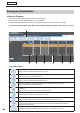


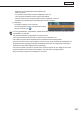


Table Of Contents
- Introduction
- Installing/Launching
- Setting Up a Server
- Launching
- Creating/Editing Programs
- The main Program Editor window
- Creating programs
- ● Valid content files
- ● Positioning content (Layout)
- ● Setting the background/frames 1-4
- ● Setting the scroll message
- ● Setting audio and music
- ● Setting the PIP window
- ● Saving a program
- ● Opening a program
- ● Checking a program
- ● Deleting a program
- ● Displaying program properties
- ● Importing/exporting a program
- Setting Information for logging in to the management PC
- Uploading/Downloading Programs, Content and Scroll Messages
- Deleting Programs, Content and Scroll Messages on the Server
- RSS Editor
- Conditional Content
- Creating/Editing Timetables
- Creating/Editing Schedules
- Logging In
- Panel Management
- Distributing
- Management
- User Management
- Viewer Update
- Schedule Reception/Program Display
- Key/Mouse Monitoring

122
Distributing
Panel Status
This button lets you check the schedules distributed to the panels.
As in the case of Distribution Schedule, both the day view and the hour view are available.
Day view
1)
3) 4)
2)
5)
Hour view
2)1)
3) 4) 6) 7)
1) View toolbar
Refer to p.115 for more details.
2) Operation toolbar
This button lets you retrieve the information of the schedules distributed to the panels.
Select a panel to retrieve the information and click this icon.
InPULLtypedistribution,theinformationwillberetrievedatthetimeofthefirstaccessfromthe
viewer PC after this operation.
This button lets you cancel the retrieval of the information of the schedules distributed to the
panels.Selectapaneltocanceltheretrievaloftheconfirmationandclickthisicon.
Prints a schedule displayed in the display list.