
Operation Manual


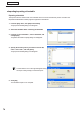




Table Of Contents
- Introduction
- Installing/Launching
- Program Creation/Editing
- The main Program Editor window
- Creating programs
- ●Valid content files
- ●Positioning content (Layout)
- ●Setting the background/frames 1-4
- ●Setting the scroll message
- ●Setting audio and music
- ●Setting the PIP window
- ●Saving a program
- ●Opening a program
- ●Checking a program
- ●Preview Program Display Settings
- ●Deleting a program
- ●Displaying program properties
- ●Importing/exporting a program
- RSS Editor
- Conditional Content
- Creating/Editing a Timetable
- Creating/Editing Schedules
- Panel Management and Option
- Distributing schedules
- Schedule Management
- Schedule Reception/Program Display
- Key/Mouse Monitoring
- Monitoring status

72
Timetable Editor
Adjusting the scale
Selectintervalsof5,10,15,30or60minutesfromthe“Scale”
list.
●Saving a timetable
Save timetable
Usethisoptionwhenyouwanttosavethecurrentlyeditedtimetableunderitsoriginalname.
1. From the [File] menu, click [Save Timetable].
You can also save a timetable by clicking
.
Thetimetablefilewillbeoverwrittenandsavedwiththesamename.
When“TimetableEditor”isstarted,thetitlebarwillread“Untitled”.Ifyouattempttosaveatthis
stagethe[SaveTimetable]dialogboxwillbedisplayed.Fortheremainingsteps,refertostep2of
“Savetimetableas”.
Save timetable as
Usethisoptionwhenyouwanttosavethecurrentlyeditedtimetableunderadifferentname.
1. From the [File] menu, click [Save Timetable As].
The[SaveAs]dialogboxwillappear.
2. Select the timetable folder in which the timetable is to be
saved.
3. Enter a “Timetable Name” and click [Save].
The timetable will be saved with a different name.
●Opening a timetable
Loadatimetablethatyouhavealreadysaved,anduseit.
Editingonlytheplacesyouwanttochangeinanexistingfileandsavingthefileunderanewnameisanefficient
way to create timetables.
1. From the [File] menu, click [Open Timetable].
You can also open a timetable by clicking
.
The[OpenTimetable]dialogboxwillappear.
2. Select the timetable folder containing the timetable.
3. From the “List of Timetable”, select a timetable, and
click [Open].
The timetable you selected will be loaded into Timetable
Editorandyouwillbeabletoeditit.
Takecarewhensavingatimetableyouhaveeditedusingthe[SaveTimetable]option,asthe
changesyouhavemadewillbereectedintheoriginalfile.
Creating a timetable