
Operation Manual
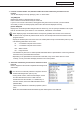

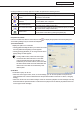


Table Of Contents
- Introduction
- Installing/Launching
- Program Creation/Editing
- The main Program Editor window
- Creating programs
- ●Valid content files
- ●Positioning content (Layout)
- ●Setting the background/frames 1-4
- ●Setting the scroll message
- ●Setting audio and music
- ●Setting the PIP window
- ●Saving a program
- ●Opening a program
- ●Checking a program
- ●Preview Program Display Settings
- ●Deleting a program
- ●Displaying program properties
- ●Importing/exporting a program
- RSS Editor
- Conditional Content
- Creating/Editing a Timetable
- Creating/Editing Schedules
- Panel Management and Option
- Distributing schedules
- Schedule Management
- Schedule Reception/Program Display
- Key/Mouse Monitoring
- Monitoring status

62
Conditional Content Editor
Creating Conditional Content
3. Click the icon.
Contentfilesareaddedtotheendoftheconditionlist.
Formoredetailsabouthowtosetplayconditionsfor
conditionlists,refertoPage64.
•InStep3,youcanregistercontentfilesbydouble-clickingthemorbydraggingthemfromtheContent
Filelisttothe[conditionlist].
•Youcanhidecontentbyclickingthe
icon on the bottom left of the screen.
•Youcanturnthesoundoffbyclickingthe icon on the bottom left of the screen.
•
Youcanskipconditionalcontentandplaythenextplaylistbyclickingthe on the bottom left of the screen.
•Bysettingtheplaybackconditions,theselectedplaybackconditionswillappearintheframebelowthe
conditions list.
•Thecontentfilesfromtheconditionslistcanbecopiedbydroppinganddraggingthemwhileholdingthe
[Ctrl]key.
•Clickingthebuttonsatthebottomofthe“ContentFile”list(
) or ( ) allows you to create a new or
editanexistingRSSconfigurationfile.(
Fp.56)
Preview Content
Youcanpreviewcontentfilesinthe[ShowContentPreview
Window]window.
Click[ShowContentPreviewWindow]fromthe[View]menu
topreviewthefiles.
Previewsfromthefollowingtypesoffileswillnotbedisplayed
immediately.Topreviewthesefiles,clicktherelevanticon
displayedinthe[ShowContentPreviewWindow]window.
(Clickthetextstringifpreviewingascrollmessage.)
•Fileswithasizeof2MBorhigher
•Videofiles
•PowerPointfiles(Previewdisplayedinfullscreenmode)
•
Scrollmessagefiles(Previewdisplayedinfullscreenmode)
Conditional Content
Contentconditionsarecheckedandonlythefirstcontent
that matches those conditions is displayed. The list plays in
order starting from the top, and contents that do not match
conditions are skipped.
The duration is the amount of time it takes to play content.
ContentfilesontheconditionlistwiththelongestdurationsaredisplayedontheMaximumDurationList.