
Operation Manual
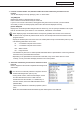

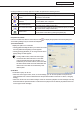


Table Of Contents
- Introduction
- Installing/Launching
- Program Creation/Editing
- The main Program Editor window
- Creating programs
- ●Valid content files
- ●Positioning content (Layout)
- ●Setting the background/frames 1-4
- ●Setting the scroll message
- ●Setting audio and music
- ●Setting the PIP window
- ●Saving a program
- ●Opening a program
- ●Checking a program
- ●Preview Program Display Settings
- ●Deleting a program
- ●Displaying program properties
- ●Importing/exporting a program
- RSS Editor
- Conditional Content
- Creating/Editing a Timetable
- Creating/Editing Schedules
- Panel Management and Option
- Distributing schedules
- Schedule Management
- Schedule Reception/Program Display
- Key/Mouse Monitoring
- Monitoring status

61
Conditional Content Editor
Creating Conditional Content
1. From the “Content Folder” tree, Select the folder where the content les you want to use are
located.
Youcanalsodisplaycontentbyspecifying“URL”or“ViewerPath.”
The [URL] Tab
DisplaystheHTMLofaspecifiedURLascontent.
EnteraURLthatcanbereferencedbytheviewerPC.
IfyourPCcanconnecttotheInternet,clicking[ViewURL]willconnecttotheURLyouhaveentered.
CheckthatyouhaveconnectedproperlyandthattheURLhasbeendisplayedcorrectly.
[Viewer Path] Tab
Displaysthecontentfilespecifiedwith[FilePathOnViewerPC].YoucanspecifyanEXEfile.Enterapath
thatcanbereferencedbytheviewerPC.ForanEXEfile,“Parameters”canbeadded.
•Whendisplayinglargecontentfilesthatarenotfrequentlyupdated,savethefilesontheviewerPC
in advance and only enter the paths that refer to them. This will help reduce the time it takes to send
program contents.
•SpecifytheabsolutepathoftheviewerPCortherelativepathfromMyContentsFolder(refertop.106).
•Thefollowingparameterscanbeused.
%L : Xcoordinateoftopleftcornerofframe
%T : Ycoordinateoftopleftcornerofframe
%W : Width of frame
%H : Height of frame
•Thissoftwareonlylaunchesorclosesspecifiedexecutablefilesataspecifiedtime.Itdoesnotguarantee
theactionsofanyexecutablefilesitlaunches.
•Dependingonthespecificationsofthefilethatisexecuted,itmaynotbeabletolaunchorclose
correctly, or it may not be able to display windows in the correct position.
2. Select the content les you want to use from the Content
File List.
RefertoPage60forfileformatscompatiblewithbackgrounds
and frames.
•Youcancheckcontentfilepreviewsinthe[ShowContent
PreviewWindow]window.(refertop.62)
•IfusingHTMLcontent,makesurethatimages,movies
andotherfilesreferredtointheHTMLcodeare
transferred to the same location, or a subdirectory of
thesamelocation,wheretheHTMLfileitselfisstored
(attachedfiles).
Thesecanbeaddedfromcontentfileproperties.(referto
p.63)
MakesurethatallattachedfilesaredefinedbytheirrelativepathsintheHTMLfile.