
Operation Manual
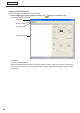


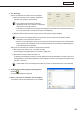


Table Of Contents
- Introduction
- Installing/Launching
- Program Creation/Editing
- The main Program Editor window
- Creating programs
- ●Valid content files
- ●Positioning content (Layout)
- ●Setting the background/frames 1-4
- ●Setting the scroll message
- ●Setting audio and music
- ●Setting the PIP window
- ●Saving a program
- ●Opening a program
- ●Checking a program
- ●Preview Program Display Settings
- ●Deleting a program
- ●Displaying program properties
- ●Importing/exporting a program
- RSS Editor
- Conditional Content
- Creating/Editing a Timetable
- Creating/Editing Schedules
- Panel Management and Option
- Distributing schedules
- Schedule Management
- Schedule Reception/Program Display
- Key/Mouse Monitoring
- Monitoring status

46
Program Editor
●Setting audio and music
Set audio and music (background music) for program display.
Iftwoormorecontentfilescontainingaudioaresetindifferentframes,bothwillplay.
1. Click the [Sound] tab.
2. From the “Content Folder” tree, select the folder where
the content les you want to use are located.
Confirmthatthe[Sound]tabisselected.Ifthetabisnot
selected, click on it.
Youcanalsoplaybackthecontentfilespecified
with“FilePathOnViewerPC”onthe[Viewer
Path]tab.Specifytheabsolutepathoftheviewer
PCortherelativepathoftheMyContentsfolder
(
F
p.106).
3. Select the content you want to use from the “Content
File” list.
Foralistofcompatibleaudiofiletypes,refertop.31.
•Clickwhileholdingdown[Ctrl]or[Shift]toselect
multiplecontentfilesatthesametime.
•Audiocannotbepositionedinalayout.Ifyou
selectamovieforthecontentfilethatwillbeused
as audio, a movie preview will be displayed in the
[ContentPreview]window,butonlyaudiowillbe
used when the program is actually displayed.
•Clickingthe“addnosoundportion”button(
)atthebottomofthe“ContentFile”listwillallow
you to add a soundless portion to the playlist. Settings for duration and order of play can be set for
soundlessportionsinthesamewayasforothercontentfiles.
4. Click
.
Contentfilesareaddedtotheendoftheplaylist.
Formoredetailsabouttheplaylist,refertop.38.
Instep3,youcanalsoregistercontentfilesbydouble-clickingthem,ordraggingthemfromthe
“ContentFile”listtothe“Playlist”.
Creating programs