
Operation Manual



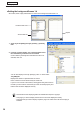


Table Of Contents
- Introduction
- Installing/Launching
- Program Creation/Editing
- The main Program Editor window
- Creating programs
- ●Valid content files
- ●Positioning content (Layout)
- ●Setting the background/frames 1-4
- ●Setting the scroll message
- ●Setting audio and music
- ●Setting the PIP window
- ●Saving a program
- ●Opening a program
- ●Checking a program
- ●Preview Program Display Settings
- ●Deleting a program
- ●Displaying program properties
- ●Importing/exporting a program
- RSS Editor
- Conditional Content
- Creating/Editing a Timetable
- Creating/Editing Schedules
- Panel Management and Option
- Distributing schedules
- Schedule Management
- Schedule Reception/Program Display
- Key/Mouse Monitoring
- Monitoring status

40
Program Editor
5) Layout
•“Keepingaspectratio”,“Notkeepingaspectratio”,and“Inoriginalsize”optionbuttons
Youcanselect“Notkeepingaspectratio”whenthecontenttypeisastillimageorFlash.
Youcanselect“Inoriginalsize”whenthecontenttypeisastillimage.
•“Temporarily,moveframe”checkbox
Tochangethescreenpositionofthecontenttemporarily,checkthischeckboxandclick[PositionSetting].
Thepositionandsizeoftheframecanbespecifiedforeachcontent.Thescreenpositionmustbesetwithin
the background frame.
6) Picture Transition
When the content type is still image, the effect at screen switching can be set.
Select the effect from each pull-down menu.
Ifyoucheckthe“Viabackground”checkbox,theeffectofdisplayingthebackgroundcoloratthetimeof
screen switching is added.
7) Parameters (for EXE le)
DisplaysparametersforEXEfiles.
●Setting the scroll message
Set scroll message content, order of play and duration of play.
Ascrollmessagefilecontainingtexttobedisplayedinthescrollmessagemustbepreparedinadvance.For
detailsabouthowtocreateascrollmessagefile,refertop.42.
1. Click the [Message1] or [Message2] tab.
2. From the “Content Folder” tree, select the folder where
the scroll message le you want to use is located.
Confirmthatthe[Message]tabisselected.Ifthetabisnot
selected, click on it.
•Youcanalsodisplaythecontentfilespecifiedwith
“FilePathOnViewerPC”onthe[ViewerPath]tab.
SpecifytheabsolutepathoftheviewerPCorthe
relativepathoftheMyContentsfolder(
F
p.106).
3. Select the scroll message le you want to use from the
“Content File” list.
Onlyscrollmessagefiles(.tlp)andconditionalcontentfor
scrollmessagefiles(.dct)canbeusedwithMessage1and
Message2.
•Clickwhileholdingdown[Ctrl]or[Shift]toselect
multiplescrollmessagefilesatthesametime.
•Youcanpreviewscrollmessagefiles.Scroll
messagefilepreviewsareavailableinfullscreen
mode only. (
F
p.38)
Creating programs