
Operation Manual



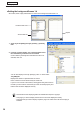


Table Of Contents
- Introduction
- Installing/Launching
- Program Creation/Editing
- The main Program Editor window
- Creating programs
- ●Valid content files
- ●Positioning content (Layout)
- ●Setting the background/frames 1-4
- ●Setting the scroll message
- ●Setting audio and music
- ●Setting the PIP window
- ●Saving a program
- ●Opening a program
- ●Checking a program
- ●Preview Program Display Settings
- ●Deleting a program
- ●Displaying program properties
- ●Importing/exporting a program
- RSS Editor
- Conditional Content
- Creating/Editing a Timetable
- Creating/Editing Schedules
- Panel Management and Option
- Distributing schedules
- Schedule Management
- Schedule Reception/Program Display
- Key/Mouse Monitoring
- Monitoring status

39
Program Editor
Background color when content is not displayed
Whencontentisnotbeingplayed,framescanbefilledinusinga
specifiedcolor.
Clickthecolorswatchtodisplaythe[Color]dialogboxand
change the background color.
Properties of content
Fromtheplaylist,selectacontentfile,andclick todisplaythe[PropertiesofContent]dialogbox.
Thefollowingsettingsmaybeadjusted:
1) Content File Path
Displaysthepathtothecontentfile.
•Clicking[AttachedFiles]willallowyoutoaddafileorfiles
fromthe[AttachedFiles]dialogboxwhichappears.
•Clicking[Change]willallowyoutochangethefileviathe
[Open]dialogboxthatappears.
IfusingHTMLcontent,makesurethatimages,movies
andotherfilesreferredtointheHTMLcodeare
transferred to the same location, or a subdirectory of the
samelocation,wheretheHTMLfileitselfisstored.Make
surethatallattachedfilesreferencedintheHTMLfileare
definedbytheirrelativepaths.
2) Duration
The duration of play can be set.
•Whenthecontenttypeisvideo,audio,orscrollmessage,you
can set the operation to be performed when playback of the
contentisfinishedbeforethespecifieddurationisreached.
Tosetthis,click[PlaySetting].
•Whenthe“Scrolltotheendofthismessage”checkboxiscleared,playbackofscrollmessagesisforcibly
terminatedafterthespecifieddurationisreachedevenifplaybackisnotfinishedyet(effectivewhenthe
content type is scroll message).
•Youhavethefollowingoptionsforwhattodowithcontentfilesafterplaytimehaspassedifthesame
contentfilesareplacedintheplaylistsuccessivelyoriftheplaylistconsistsofonecontentfile.
3) Background
Ifthecontentisastillimagefileandyouhavecheckedthe“Keepingaspectratio”optionbutton,youcan
specify a background color for the content.
Clickthecolorswatchtodisplaythe[Color]dialogboxandchangethebackgroundcolor.
Clicktheboxnextto“Transparent”tomakethebackgroundtransparent.
The background color for the background frame cannot be set to transparent.
4) Volume Control
The volume can be set.
Creating programs