
Operation Manual


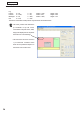



Table Of Contents
- Introduction
- Installing/Launching
- Program Creation/Editing
- The main Program Editor window
- Creating programs
- ●Valid content files
- ●Positioning content (Layout)
- ●Setting the background/frames 1-4
- ●Setting the scroll message
- ●Setting audio and music
- ●Setting the PIP window
- ●Saving a program
- ●Opening a program
- ●Checking a program
- ●Preview Program Display Settings
- ●Deleting a program
- ●Displaying program properties
- ●Importing/exporting a program
- RSS Editor
- Conditional Content
- Creating/Editing a Timetable
- Creating/Editing Schedules
- Panel Management and Option
- Distributing schedules
- Schedule Management
- Schedule Reception/Program Display
- Key/Mouse Monitoring
- Monitoring status

34
Program Editor
Creating programs
E.g.
Frame1: X=25, Y=20, Width=1338, Height=835
Frame2: X=1380, Y=25, Width=523, Height=830
Message1: X=20, Y=869, Width=1883, Height=194
PIP: X=578, Y=395
The above coordinates would produce a layout like the screenshot below.
•The name, position and dimensions
(X coordinate of top left corner,
Ycoordinateoftopleftcorner,width,
height) are displayed in the top left of
each frame or scroll message.
•
The PIP frame cannot be moved in
1 pt increments. Locations where
items can be positioned depend on
thekindofLCDmonitorused.