
Operation Manual



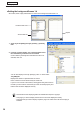


Table Of Contents
- Introduction
- Installing/Launching
- Program Creation/Editing
- The main Program Editor window
- Creating programs
- ●Valid content files
- ●Positioning content (Layout)
- ●Setting the background/frames 1-4
- ●Setting the scroll message
- ●Setting audio and music
- ●Setting the PIP window
- ●Saving a program
- ●Opening a program
- ●Checking a program
- ●Preview Program Display Settings
- ●Deleting a program
- ●Displaying program properties
- ●Importing/exporting a program
- RSS Editor
- Conditional Content
- Creating/Editing a Timetable
- Creating/Editing Schedules
- Panel Management and Option
- Distributing schedules
- Schedule Management
- Schedule Reception/Program Display
- Key/Mouse Monitoring
- Monitoring status

32
Program Editor
●Positioning content (Layout)
Screensandcontentsizeandposition,etc.,aresetinthe
[Layout]window.
When“LayoutLocked.”isdisplayedinthecenterofthelayoutwindow,thelayoutcannotbe
edited.
Clearthe“Thelayouteditislocked.”checkboxinthe[PropertiesofProgram]dialogbox(
F
p.51).
1. Check that the [Layout] tab is selected.
Ifitisnot,clickthe[Layout]tabtoselectit.
2. Set a [Screen Top-Left Position].
Set the coordinates (-9999 - 9999) for where you want the top
left hand corner of the background to be positioned in the panel.
“X”and“Y”areusuallysetto“0”.(Default)
3. Set the “Screen Size”.
Thescreensizeisthesizeofthebackground.
Selectthe“PresetScreenSize”optionbutton,andchoosea
sizefromthelist.
Thisisusuallysettothesizeofthepanel(i.e.panel
resolution).
•
Ifthesizeyouwantisnotinthelist,selectthe
“CustomScreenSize”optionbutton,andenterasize.
•Tochangethepresetscreensizesinthelist,editthe“ScreenSize.dat”filefoundinthefolder
whereyouinstalledthissoftware(thedefaultdirectoryis,C:\ProgramFiles\SHARP\SHARPDigital
SignageSoftware)specifyingsizesinorderof“width”then“height”asintheexamplesbelow.
1280,1024
1920,1080
1366,768
WhenyoustartProgramEditorthescreensizeonthefirstlinewillbeselected.
•If you want to combine multiple panels and have
themdisplayedasonepanel,click[Calculate
screensizeforMultidisplay]andsetthescreen
sizesimplybyselectingthemodelnameand
direction.
•Whenyouclick[CalculatescreensizeforMulti
display],the[MonitorSettings]dialogboxwill
appear.YoucansetModelName,Compositionand
Direction for multiple monitors.
[Layout]window
Creating programs