
Operation Manual


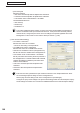

Table Of Contents
- Introduction
- Installing/Launching
- Program Creation/Editing
- The main Program Editor window
- Creating programs
- ●Valid content files
- ●Positioning content (Layout)
- ●Setting the background/frames 1-4
- ●Setting the scroll message
- ●Setting audio and music
- ●Setting the PIP window
- ●Saving a program
- ●Opening a program
- ●Checking a program
- ●Preview Program Display Settings
- ●Deleting a program
- ●Displaying program properties
- ●Importing/exporting a program
- RSS Editor
- Conditional Content
- Creating/Editing a Timetable
- Creating/Editing Schedules
- Panel Management and Option
- Distributing schedules
- Schedule Management
- Schedule Reception/Program Display
- Key/Mouse Monitoring
- Monitoring status

110
FTP Server/Client Scheduler
Setting Description Default
LAN
Host name or IP
address
EnterthehostnameortheIPaddressofthepaneltobe
controlledwithin32alphanumericcharacters.
-
Data port
Enteradataportnumberbetween1025and65535forthe
panels to be controlled.
10008
Username
Entertheusername,ifoneexistsforthepanelstobe
controlled,in8charactersorless.
-
Password
Enterthepassword,ifoneexistsforthepanelstobe
controlled,in8charactersorless.
-
• [Testconnection]
Checktheconnectiontoconfirmthatthepanelcanbecontrolled.Aftertheconnectionisestablished
successfully,themodelnameofthepanelisacquiredanddisplayed.Performoperationwiththe
powerofthepanelturnedon.TocontrolthepanelwiththeLB-1085,besuretochecktheconnection
once.Thepanelcannotbecontrolledunlessa“Testconnection”isperformed.
• “MultiplePanels”optionbutton
Youcanselectandcontrolpanelsfromupto25panels.
• [ConnectionSetting]
A list of connected panels appears when you click
[ConnectionSetting].
Addpanelstothelistthefirsttimeyouusethisfunction
byclicking[Add].
Setting Description Default
RS-232C
COMport COM1~COM256 COM1
Baud Rate 9600,19200,38400 9600
LAN
Host name or IP
address
EnterthehostnameortheIPaddressofthepaneltobe
controlledwithin32alphanumericcharacters.
-
Data port
Enteradataportnumberbetween1025and65535forthe
panels to be controlled.
10008
Username
Entertheusername,ifoneexistsforthepanelstobe
controlled,in8charactersorless.
-
Password
Enterthepassword,ifoneexistsforthepanelstobe
controlled,in8charactersorless.
-
Panel IDs
SelectIDsinordertoidentifypanelswhenPCsareconnected
in a daisy chain.
(No daisy chain), 1-255
(No daisy
chain)
• “PowerONthepanelbeforestartingupthissoftware.”checkbox
Whenthischeckboxischecked,thepowerofthepanelisturnedonwhentheClientScheduleris
started.
Client Scheduler