
Operation Manual


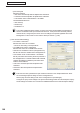

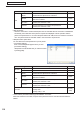
Table Of Contents
- Introduction
- Installing/Launching
- Program Creation/Editing
- The main Program Editor window
- Creating programs
- ●Valid content files
- ●Positioning content (Layout)
- ●Setting the background/frames 1-4
- ●Setting the scroll message
- ●Setting audio and music
- ●Setting the PIP window
- ●Saving a program
- ●Opening a program
- ●Checking a program
- ●Preview Program Display Settings
- ●Deleting a program
- ●Displaying program properties
- ●Importing/exporting a program
- RSS Editor
- Conditional Content
- Creating/Editing a Timetable
- Creating/Editing Schedules
- Panel Management and Option
- Distributing schedules
- Schedule Management
- Schedule Reception/Program Display
- Key/Mouse Monitoring
- Monitoring status

109
FTP Server/Client Scheduler
• TenantID
SetsanoperationgroupIDfortheviewerPC.
TheoperationgroupIDisonlyvalidwhenselectingthe“ProWEBServerVersion”radiobutton.
• ViewerID:SetsanoperationViewerIDfortheviewerPC.
• Accessinterval:Setthelengthofthetimeintervalforcheckingfordistributeddata.
•
[Detail]
Set the length of the interval for periodic access.
•
Firstaccesstime:Settheinitialtimeforaccessingthe
HTTP Server.
•
RetryCount:Setthenumberofretriestoattempt
reconnection when a communications error occurs.
•
Retry Interval: Set the length of the time interval for
attempting reconnection when a communications error
occurs.
• “
Checknewscheduledata,oncethenetwork
connectionisestablishedalso”checkbox
Checkthisboxtoreceivedatanotonlywhendatais
transmittedfromthemanagementPCduringaccess
tothemanagementPCatregularintervalsbutalsoto
receive data in the conditions listed below.
•
WhenlaunchingtheClientScheduler
•
When changing the network settings
•
Whenanetworkenvironmentchangehasbeendetected(WhentheIPaddressischanged,anLAN
is connected, etc.)
•
[Register/UpdatethisPCtoManagementPC]
ClickthebuttontosendtheviewerPCinformationtothemanagementPC.Youcaneasilyregisterthe
viewerPCinformationtothemanagementPC.
Tousetheabovefunctions,thefollowingconditionsarerequired:
•DigitalSignagePromustbeinstalledonthemanagementPC.
•SimpleWebServermustberunningonthemanagementPC.
*WhenaviewerIDisnotsetinPUSHtypedistribution,theabovesettingsarenotneeded.
[Panel Control] tab
Selectthepanelcontrolmethod(RS-232C/LAN).
• “Nopanel”optionbutton
Panels will not be controlled.
• “Singlepanel”optionbutton
Click[ConnectionSetting]andselectthepanelcontrol
method(RS-232C/LAN).
• [ConnectionSetting]
Selecteither“RS-232C”or“LAN”fromthe[Connectinginterface]optionbuttons.
Setting Description Default
RS-232C
COMport COM1~COM256 COM1
Baud Rate 9600,19200,38400 9600
Client Scheduler