
Operation Manual


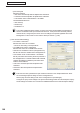

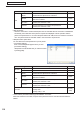
Table Of Contents
- Introduction
- Installing/Launching
- Program Creation/Editing
- The main Program Editor window
- Creating programs
- ●Valid content files
- ●Positioning content (Layout)
- ●Setting the background/frames 1-4
- ●Setting the scroll message
- ●Setting audio and music
- ●Setting the PIP window
- ●Saving a program
- ●Opening a program
- ●Checking a program
- ●Preview Program Display Settings
- ●Deleting a program
- ●Displaying program properties
- ●Importing/exporting a program
- RSS Editor
- Conditional Content
- Creating/Editing a Timetable
- Creating/Editing Schedules
- Panel Management and Option
- Distributing schedules
- Schedule Management
- Schedule Reception/Program Display
- Key/Mouse Monitoring
- Monitoring status

107
FTP Server/Client Scheduler
• [SetPanelAttribute]
YoucansetViewerPCpanelattributesand“Panelname,”“Group”and“Comment.”
Thissettingisforplayingdifferentcontentineachpanelduringconditionalcontentplayback.
[Display Area] tab
• “Displayareafordistributedprogram”
Whenthedisplayareaoftheprogramandtheresolution
ofthepanelaredifferent,thistaballowsyoutodisplaythe
programregardlessofthedisplayareasetfortheprogram.
Checkthe“Alwaysdisplaythedistributedprograminthe
followingarea”checkboxandsettheareainwhichthe
programistobedisplayed.
• “Displayareaforemergencyscrollmessage”
Setthedisplayareaforemergencyscrollmessages.
Emergencyscrollmessagescanbedistributedfrome‑SignagePro(PN‑SS05).
Emergencyscrollmessagescannotbedistributedfrome‑Signage(PN‑SS01/SS02).
[Power Control] tab
ManagespoweronviewerPCscurrentlybeingcongured.
•
“Shutdownonthedesignatedtime”checkbox
CheckthisboxtoturnofftheviewerPCatthespeciedtime.
• “Rebootonthedesignatedtime”checkbox
CheckthisboxtorestarttheviewerPCatthespeciedtime.
[Network] tab
Setthemethodusedtoacquiredatafromthenetwork.
• “PUSHtypedistribution”radiobutton
Thedatadistributedatthetimingofwhenthemanual
transmissionprocedureiscompletedonthemanagement
PCisrecievedusingFTPprotocols.
• “UseViewerIDinsteadofhostnameorIPaddress”
checkbox
TheIPaddressissenttothemanagementPCbythe
viewerPCusingHTTPprotocols.CheckthisboxiftheIP
addressoftheviewerPCisnotaxedIPaddress.Click
[LaunchHTTPSevernow]onthe[HTTPServer]tabinthe
SHARPDigitalSignageSoftwareProWEBServerVersion
CongurationToolwindowtolaunchtheTinyWEBServer.
•“PULLtypedistribution”radiobutton
EachviewerPCretrievesdistributiondatafromthe
managementPCatregularintervalsusingtheHTTP
protocol.
•TheviewerPCcanonlyusePULLtypedistributionor“UseViewerIDinsteadofhostnameorIP
address”ofPUSHtypedistributionifDigitalSignageProisinstalledonthemanagementPC.
•Inordertouse“UseViewerIDinsteadofhostnameorIPaddress”of“PUSHtypedistribution”,the
SimpleWebServerofDigitalSignagePromustberunning.
•Inordertouse“PULLtypedistribution”,theSimpleWebServerofDigitalSignagePromustbe
running.ThiscanonlybesetintheViewerVersion.
The[Network]tabcanonlybeconguredintheDigitalSignageSoftwareViewerVersion(PN‑
SV01).
Client Scheduler