
Operation Manual


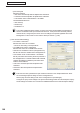

Table Of Contents
- Introduction
- Installing/Launching
- Program Creation/Editing
- The main Program Editor window
- Creating programs
- ●Valid content files
- ●Positioning content (Layout)
- ●Setting the background/frames 1-4
- ●Setting the scroll message
- ●Setting audio and music
- ●Setting the PIP window
- ●Saving a program
- ●Opening a program
- ●Checking a program
- ●Preview Program Display Settings
- ●Deleting a program
- ●Displaying program properties
- ●Importing/exporting a program
- RSS Editor
- Conditional Content
- Creating/Editing a Timetable
- Creating/Editing Schedules
- Panel Management and Option
- Distributing schedules
- Schedule Management
- Schedule Reception/Program Display
- Key/Mouse Monitoring
- Monitoring status

106
FTP Server/Client Scheduler
• Theareasetunderthe[DisplayArea]tabwillbethedisplayarea(exceptwhenaprogramisspecied).
• “Smoothcontentschange”checkbox
Checkthischeckboxtoswitchbetweencontentssmoothlybypreparingtheplaybackofthenext
contentbeforetheendofthecurrentcontent.Alsocheckthischeckboxwhenitisnecessaryto
synchronizethecontentdisplaybetweenframes.
Clicking[PreloadSetting]allowsyoutosetthecontentthatistobereadinadvance.
•Makingtheswitchingofcontentssmoothwill
increasetheloadontheCPUandthememoryuse
amount.Itisrecommendedthattestsbeconducted
byactuallydisplayingprogramsbeforeoperation.
•Whenperformingadvancedreadingofacontent
thatcanbeplayedwithWindowsMediaPlayer,
thevideoacceleratorisdisabled.Checkthatyour
PChasenoughperformancetodisplaycontents
withoutthevideoaccelerator(WindowsXPOnly).
•IfacontentthatcanbeplayedwithInternet
Explorerisreadinadvance,Flashcontentsand
bannersembeddedinthecontentmaybestarted
fromthemiddle.
• “Setlimitofprintscreenarea”checkbox
Whenyouareoutputtingmultiplescreensonaviewer
PC,theScreenCapturefunctioncapturestheentire
desktop.Checkthisboxtocapturejustapartofthe
screenoutput.
Click[AreaSetting]anddenetheareayouwantto
capture.
• “Don’tmovefocuswhileprogramviewerstarts”checkbox
Thisboxisusuallyleftunchecked.
CheckthisboxifyoudonotwanttheProgramViewerfocustomovewhenyoulaunchtheProgram
Viewer.
• “Hidetaskbarwhileshowing”checkbox
Whenthischeckboxischecked,thetaskbarishiddenwhenProgramViewerislaunchedanditis
re‑displayedwhenProgramViewerisclosed.
• “Play*.movleswithWindowsMediaPlayer(Windows7only)”checkbox
ThisboxcanonlybecheckedwhenusingWindows7.Checkthisboxtoplay.movlesonWindows
MediaPlayer.
• “MyContentsfolder”:Enterthepathofthefolderinwhichcontentstobedistributedinadvancearetobe
saved.
Theinitialdefaultvaluesare:
•MyContentsfolder:C:\ProgramFiles\SHARP\SHARPDigitalSignageSoftware\MyContents\
(ForWindowsVista/7,C:\ProgramData\SHARP\SHARPDigitalSignageSoftware\MyContents\)
•InDigitalSignageSoftwarePro(PN‑SS05),contentcanbedistributedinadvancetotheMy
Contentfolder.
Client Scheduler