
Operation Manual


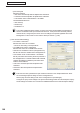

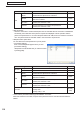
Table Of Contents
- Introduction
- Installing/Launching
- Program Creation/Editing
- The main Program Editor window
- Creating programs
- ●Valid content files
- ●Positioning content (Layout)
- ●Setting the background/frames 1-4
- ●Setting the scroll message
- ●Setting audio and music
- ●Setting the PIP window
- ●Saving a program
- ●Opening a program
- ●Checking a program
- ●Preview Program Display Settings
- ●Deleting a program
- ●Displaying program properties
- ●Importing/exporting a program
- RSS Editor
- Conditional Content
- Creating/Editing a Timetable
- Creating/Editing Schedules
- Panel Management and Option
- Distributing schedules
- Schedule Management
- Schedule Reception/Program Display
- Key/Mouse Monitoring
- Monitoring status

105
FTP Server/Client Scheduler
Client Scheduler
ClientSchedulerisusedontheviewerPC.
Itloadstheschedulesandbreak-inprogramsthathavebeenreceivedbytheFTPServer,andcontrolsthe
ProgramViewertodisplayspecifiedprogramsatthespecifiedtime.
●Launching Client Scheduler
ClientSchedulerisautomaticallylaunchedby“Startup”whenWindowslaunches.
WhenClientSchedulerlaunches,anicon(
) is displayed (and resides permanently) in the Task Tray.
●Client Scheduler menu
The menu that appears when the icon in the Task Tray is
right-clicked performs the following actions:
Setting
Clickingthe[Setting]menudisplaysthe[SettingofClientScheduler]dialogbox.Thetabsinthisdialogbox
contain the following settings:
[Program Viewer] tab
ContainsdetailedsettingsfortheProgramViewer.
• Youcanviewprogramsevenwhenthereareno
programsbeingdisplayedbycheckingthe“Paintthe
programviewarea,ifnoprogramisplayed.”checkbox.
Setthedisplaycontentbyclicking[PaintSetting].
· [Darkblue]optionbutton
Displaystheareadefinedby“Displayarea”settingsin
dark blue.
· “Contentfile”optionbutton
Setsthecontentfilepath,displaymethod,and
backgroundcolorfromthe[Settingofthecontentsfile]
dialogboxthatappearswhen[Setting]isclicked.
1) Click[Ref],andselectacontentfile.Youmayselect
anyfileformatthatissupportedbythisproduct.
2) Selecta“Displaymode”fromthe“Keepingaspect
ratio”,“Notkeepingaspectratio”,or“Inoriginalsize”
option buttons.
3) Setthe“Backgroundcolor”.
· “Program”optionbutton
Click[Import],andselectanexistingprogram.Youmay
selectprogramsthathavebeenexportedwithProgram
Editor.
Client Scheduler