
Operation Manual



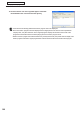
Table Of Contents
- Introduction
- Installing/Launching
- Program Creation/Editing
- The main Program Editor window
- Creating programs
- ●Valid content files
- ●Positioning content (Layout)
- ●Setting the background/frames 1-4
- ●Setting the scroll message
- ●Setting audio and music
- ●Setting the PIP window
- ●Saving a program
- ●Opening a program
- ●Checking a program
- ●Preview Program Display Settings
- ●Deleting a program
- ●Displaying program properties
- ●Importing/exporting a program
- RSS Editor
- Conditional Content
- Creating/Editing a Timetable
- Creating/Editing Schedules
- Panel Management and Option
- Distributing schedules
- Schedule Management
- Schedule Reception/Program Display
- Key/Mouse Monitoring
- Monitoring status

100
Schedule Distribution Tool
Displaying break-in programs
10. A screen like the one on the right will appear. Check that
the distribution was successful and click [Close].
•Ifthesettimehasalreadypassedthebreak-inprogramwillnotbedisplayed.
•Oncethebreak-inprogramhasbeendisplayedinthetargetpanelfortheamountoftimespecifiedin
“DisplayTime”,thepanelwillreturntotheoriginalprogram.Displaywillresumefromthestartofthe
program that would otherwise have been playing when the break-in program ends.
•
Whetherabreak-inprogramhasendedischeckedeveryminute(atsecond00).Thepointatwhichthedisplayofthe
break-inprogramendsandtheoriginalprogramstartsisthefirstsecond00aftertheendofthebreak-inprogram.