
Operation Manual
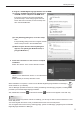
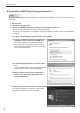
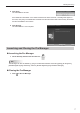

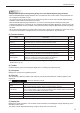
Table Of Contents

7
Installing/Launching
5. Click [Yes].
The uninstallation will start.
If the Distribution Scheduler or the Client Scheduler has been launched, a message will appear. In
this case, click [Yes]. The Distribution Scheduler and the Client Scheduler will be forcibly terminated
and the uninstallation will continue.
6. Click [Finish].
The uninstallation is now complete.
Launching and Closing the Pro Manager
Launching the Pro Manager
On the desktop, double-click the short cut 1. .
TIPS
The Manager can also be started by going to the Windows Taskbar and clicking [Start], [All Programs],
[SHARP Digital Signage Software], and then [SHARP Digital Signage Software Manager].
Closing the Pro Manager
Click 1. on the Pro Manager.