
Operation Manual
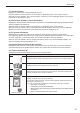
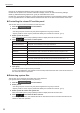

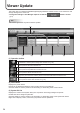


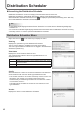
Table Of Contents

40
Distribution Scheduler
Launching the Distribution Scheduler
Distribution Scheduler is a tool for managing communications with the viewer PC.
Distribution Scheduler is automatically launched by “Startup” when Windows launches.
When Distribution Scheduler launches, an icon (
) is displayed (and resides permanently) in the Task Tray.
Do not exit Distribution Scheduler unnecessarily.
TIPS
The SHARP Digital Signage Software Server Scheduler is not used with the SHARP Digital Signage •
Software Pro.
Do not launch the SHARP Digital Signage Software Server Scheduler when the Distribution Scheduler is running.•
Normally, there is no need to operate the Distribution Scheduler.•
Distribution Scheduler Menu
Right-click the icon ( ) in the Task Tray to display the menu.
View log
Displays the operation log of the Distribution Scheduler.
The log can be cleared or updated to the most recent status.
The PULL type distribution activities are not logged in the Distribution
Scheduler operation log.
View status
Displays the communication status as a list.
The communication status of the PULL type distribution is not
displayed in the list.
# Displays the connection number of the communication.
Hostname
Displays the host name (or the IP address) of the other end of
the communication.
Kind Displays the kind of the communication.
Status Displays the progress status of the communication.
Cong
Sets the maximum number of connections allowed for simultaneous
communications with the other PUSH type distribution hosts.
* This number includes a connection exclusively used for control. For
this reason, the number of connections that can be used
simultaneously for distributing schedules is “the maximum number
of connections minus 1”.
This setting does not affect the number of connections for PULL
type distribution.
Version
Displays the version of the Distribution Scheduler.