
Operation Manual
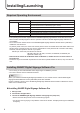
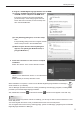
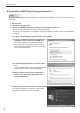

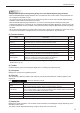
Table Of Contents

4
Installing/Launching
Required Operating Environment
Item Description
PC CPU 2 GHz or higher Pentium 4 processor
OS Microsoft Windows XP, Windows Vista, Windows 7 (English version)
Microsoft Windows Server 2003/2008 (English version)
Memory 512 MB or higher
Hard disk 40 MB or more free space (Additional space required for saving data)
Interfaces LAN port (TCP/IP communication must be functional)
Monitor Full color display with resolution of at least 1280 x 1024
SHARP Digital Signage Software PN-SS02 (network version)
* The operating environment requirements for SHARP Digital Signage Software must also be met to be
able to create and edit programs. See the operation manual for SHARP Digital Signage Software for
more details.
* You must have the newest version of the SHARP Digital Signage Software Viewer Version (PN-SV01)
installed on the viewer PC.
To perform panel control, the viewer PC and the panel must be connected with an RS-232C cable or the
panelmustbeconnectedtotheLAN.Forthespecicationsofthepanelanditsconnectionandsetting
methods, read the operation manual of your panel.
Monitor (for viewer PC): PN series LCD monitor
LB-1085, LB-T401, LB-T461, LB-T601, LB-46GX35, LB-52GX35 (For
Japanese market only)
* If the OS of the viewer PC is Windows Vista or Windows 7, disable the user account control of
the viewer PC.
* If there are any environmental requirements for the OS to operate besides the above, they must also be
met.
Installing SHARP Digital Signage Software Pro
You must log in as an administrator before beginning the installation process.•
You need a license code to install this software.•
TIPS
When you install the SHARP Digital Signage Software Pro, the newest version of the SHARP Digital
Signage Software Network Version (PN-SS02) will be also installed.
If there is already a version of the SHARP Digital Signage Software Network Version installed on the PC,
makesuretouninstallitrst.
Installing SHARP Digital Signage Software Pro
Start your PC.1.
Close down all applications.2.
Launch the SHARP Digital Signage Software setup program (setup.exe).3.
Double-clickthesetup.exeletolaunchthesetupprogram.•
Ifasecuritywarningsaying‘Thepublishercouldnotbeveried.’isdisplayedduringtheinstallation,•
click [Run].