
Operation Manual

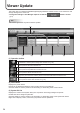


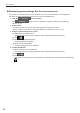
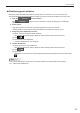
Table Of Contents

39
Viewer Update
Distributing panel attributes
Distributes panel attributes (Panel Names, Group Names, Comments 1 to 3) to the viewer PCs.
The panel attributes are used as judgment criteria for playing conditional contents on the viewer PC.
Click the 1.
function button.
If the
function button is not shown, change the settings in Pro Manager
Options. (p.11)
Select panels.2.
Use the group tree to show only the panels registered in a group on the list.•
Specifyaltertoshowonlythepanelsthatsatisfytheconditionsonthelist.(p.10)•
Assign the panel attributes to a panel.3.
(1) Select a panel to assign the panel attributes.
Click while holding down [Ctrl] or [Shift] to select multiple panels at the same time.
(2) Click
.
(3) Click [Assign Panel Attributes].
The panel attributes are now assigned.
Conrmdistribution4.
(1)Selectapaneltoconrmdistribution.
Click while holding down [Ctrl] or [Shift] to select multiple panels at the same time.
(2) Click
.
(3) Click [Yes].
Distributionisnowconrmed.Conrmedpanelattributesaremarkedwiththeconrmedsign
(
).
TIPS
The “Group” attribute is a string in which the group hierarchy is represented by the symbol “/”. •
E.g.: “/Kanto/Tokyo/23districts”