
Operation Manual
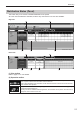
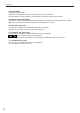

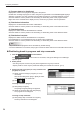
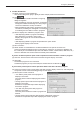
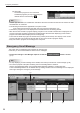
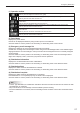

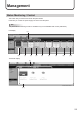
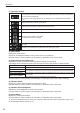
Table Of Contents

27
Emergency Distribution
(1) Operation toolbar
Assigns an emergency scroll message (or a stop command for scroll message) to a panel.
Select a panel to assign and click this icon. (p.28)
Reverts to the state before a scroll message (or a stop command) was assigned.
Select a panel to revert and click this icon.
Stops uncompleted distribution of a scroll message (or a stop command) and cancels the
conrmation.
Select a panel to stop distribution and click this icon.
Resend a scroll message (or a stop command) for which a distribution error has occurred.
Select a panel to resend and click this icon.
Cancelstheconrmationofascrollmessage(orastopcommand)whichwasassignedtoapanel
andconrmed.
Selectapaneltocanceltheconrmationandclickthisicon.
Conrmsascrollmessage(orastopcommand)andreservesdistribution.
Selectapaneltoconrmandclickthisicon.
(2) Panel Name
Displays the panel names.
Panels can be displayed selectively using the Group tree or the Filter bar.
Click the header to sort the panels in the ascending or descending order of their names.
(3) Emergency scroll message list
Displays the details of the scroll messages assigned to the panels.
Double-click an assigned scroll message to edit it using the Scroll Message Editor of the SHARP Digital
Signage Software. A scroll message or a stop command can be assigned if there is no already assigned
scroll message.
Click the header to sort the panels in the ascending or descending order of the scroll message names.
Right-click to display a menu, which lets you perform various operations.
(4) Distribution Information
Displaystheconrmeddatesandtimesofdistribution.
Click the header to sort the panels in the ascending or descending order of the dates and times.
(5) Distribution Start
Displays the dates and times the distribution is started.
Click the header to sort the panels in the ascending or descending order of the dates and times.
(6) Distribution Complete
Displays the dates and times the distribution is completed.
If the distribution is not completed properly, the reason will be displayed.
Click the header to sort the panels in the ascending or descending order of the dates and times.
TIPS
InPULLtypedistribution,thedistributionwillstartatthetimeoftherstaccessfromtheviewerPCafter•
thedistributionisconrmed.
Stop commands for scroll message cannot be edited by double-clicking.•
Oncethedistributionisconrmed,thescrollmessagecannotbeedited.Canceltheconrmationrstto•
edit it.