
Operation Manual

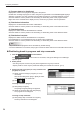
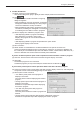
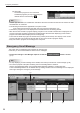
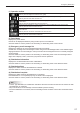

Table Of Contents

25
Emergency Distribution
Conrmdistribution4.
(1)Selectapaneltoconrmdistribution.
Click while holding down [Ctrl] or [Shift] to select multiple panels at the same time.
(2) Click
.
The [Start time and duration of Break-in Program]
dialog box appears.
•Whendistributingonlystopcommands,amessage
will appear instead of this dialog box. Click [Yes] to
conrmthedistributionofstopcommands.
•Whendistributingbothbreak-inprogramsandstop
commands, the dialog box will appear. The settings
in the dialog box are valid for break-in programs.
(3) Set the “Display time of Break-in program” area.
•“StartdisplayingBreak-inprogramimmediately
after distribution is complete” option button
Displays the program as soon as the distribution
wizard exits.
•“StartdisplayingBreak-inprogramatspeciedtime”optionbutton
Starts program display at the set time.
(4) Set a “Duration”.
(5) Select whether to re-distribute the contents distributed in the past to the viewer PC.
Checkthe“DistributedifferencesfromcontentlesonviewerPC”checkboxtodistributeonly
thecontentsyettobedistributed(theleswithdifferentnames,creationdates,datasizes,etc.)
and not to distribute the contents that have already been distributed.
If you do not want to perform panel control operations before and after a break-in program:
(6) Clear the “Perform Panel control before and after Program display” check box.
(7) Click [OK].
Thebreak-inprogramisnowconrmed.
Conrmedprograms(orstopcommands)aremarkedwiththeconrmedsign(
).
If you want to perform panel control operations before and after a break-in program:
(6) Check the “Perform Panel control before and after Program display” check box, and click [Next].
The [Panel Control Command Setting] dialog box will appear.
(7) Set the panel control command.
•“TurnONthepanelpowerbeforeprogramis
displayed” check box
Turns the panel on before displaying the break-in
program.
•“Changepanelinputasfollowsbeforeprogramis
displayed” check box
Switchestothespeciedinputbeforedisplaying
the break-in program.
•“TurnOFFthepanelpowerafterprogramis
displayed” check box
Turns the panel off after the break-in program has
nished.
•“Changepanelinputasfollowingafterprogramisdisplayed”checkbox
Switchestothespeciedinputafterdisplayingthebreak-inprogram.