
Operation Manual
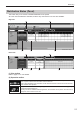
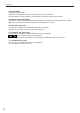

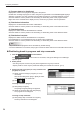
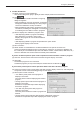
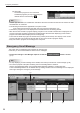
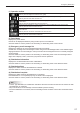

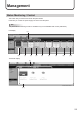
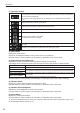
Table Of Contents

23
Break-in Program
This button lets you distribute break-in programs for emergency.
It also lets you check the distribution status of such programs.
It is also possible to send a stop command for programs to halt the break-in program in the middle.
* Change the settings in Pro Manager Options so that the
button is shown.
(p.11)
(1)
(2) (3) (4) (5) (6)
(1) Operation toolbar
Assigns a break-in program (or a stop command for program) to a panel.
Select a panel to assign and click this icon. (p.24)
Reverts to the state before a program (or a stop command) was assigned.
Select a panel to revert and click this icon.
Stopsuncompleteddistributionofaprogram(orastopcommand)andcancelstheconrmation.
Select a panel to stop distribution and click this icon.
Resend a program (or a stop command) for which a distribution error has occurred.
Select a panel to resend and click this icon.
Cancelstheconrmationofaprogram(orastopcommand)whichwasassignedtoapaneland
conrmed.
Selectapaneltocanceltheconrmationandclickthisicon.
Conrmsaprogram(orastopcommand)andreservesdistribution.
Selectapaneltoconrmandclickthisicon.(p.24)
(2) Panel Name
Displays the panel names.
Panels can be displayed selectively using the Group tree or the Filter bar.
Click the header to sort the panels in the ascending or descending order of their names.
Emergency Distribution