
Operation Manual
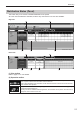

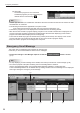
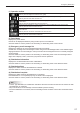

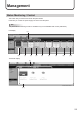
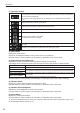
Table Of Contents

22
Distributing
(3) Panel Name
Displays the panel names.
Panels can be displayed selectively using the Group tree or the Filter bar.
Click the header to sort the panels in the ascending or descending order of their names.
(4) Retrieve Schedule Status
Displays the names of retrieved schedules and the dates and times when their retrieval was complete.
Right-click this to display a menu and retrieve the schedule from the menu.
(5) Calendar (day view)
For each day, the details of the timetable for the day is displayed.
Double-click the header to show the hour view of the day.
(6) Timetable list (hour view)
For each day, the details of the timetable set for the day is displayed.
/ lets you change the day to be displayed.
Click the header to sort the timetables in the ascending or descending order of their names.
(7) Timetable (hour view)
For each day, the timetable set for the day is displayed.
Click a program to view its thumbnail.