
Operation Manual


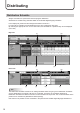

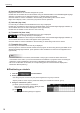
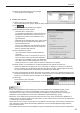

Table Of Contents

20
Distributing
Distribution Status (Delivery)
This button lets you check the schedule distribution status.
(1)
(2) (3) (4) (5) (6)
(1) Operation toolbar
Stopsuncompletedscheduledistributionandcancelstheconrmation.
Select a panel to stop distribution and click this icon.
Resends the schedule for which a distribution error has occurred.
Select a panel to resend the schedule and click this icon.
(2) Panel Name
Displays the panel names.
Panels can be displayed selectively using the Group tree or the Filter bar.
Click the header to sort the panels in the ascending or descending order of their names.
(3) Distribution Information
Displaysthenamesofassignedschedulesandtheconrmeddatesandtimesoftheirdistribution.
Click the header to sort the panels in the ascending or descending order of the dates and times.
(4) Distribution Schedule
Displays the dates and times the distribution is scheduled for.
Click the header to sort the panels in the ascending or descending order of the dates and times.
(5) Distribution Start
Displays the dates and times the distribution is started.
Click the header to sort the panels in the ascending or descending order of the dates and times.
(6) Distribution Complete
Displays the dates and times the distribution is completed.
If the distribution is not completed properly, the reason will be displayed.
Click the header to sort the panels in the ascending or descending order of the dates and times.