
Operation Manual


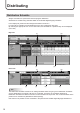

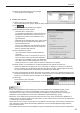

Table Of Contents

17
Distributing
(1) View toolbar
Speciesthedates(thestartdateandtheenddate)tobedisplayedonthe
display list in the day view.
Click the icon to display a dialog box and click the start date (end date) in the
dialog box.
The maximum number of days to display is 62 days.
Speciesthedatetobedisplayedonthedisplaylistinthehourview.
Click the icon to display a dialog box and click the date in the dialog box.
Speciestheduration(thestarttimeandtheendtime)tobedisplayedonthe
display list in the hour view.
Click the icon to display a dialog box and specify the start time and the end
time in the dialog box. Then click [OK].
TIPS
Thedatecanbespeciedbetween1January2005and31December2020.
Sets the display list to the day view.
The width of an item (a day) in the display list can be changed.
Sets the display list to the hour view.
The width of an hour in the display list can be changed.
(2) Operation toolbar
Assigns a schedule to a panel.
Select a panel to assign the schedule and click this icon. (p.18)
Reverts to the state before the schedule was assigned.
Select a panel to revert and click this icon.
Displays the schedule assigned to the panel shown in the display list using an application
associatedtothexml/htmlles(typicallytheMicrosoftInternetExplorer).
If printing function is available with the application, the schedule can be printed.
Click the icon to display the menu to select xml or html.
Cancelstheconrmationoftheschedulewhichwasassignedtoapanelandconrmed.
Selectapaneltocanceltheconrmationandclickthisicon.
Conrmsthescheduleandreservesdistribution.
Selectapaneltoconrmthescheduleandclickthisicon.(p.18)
TIPS
Tocancelconrmationsoftheschedulewhichiswaitingfordistributionorbeingdistributed,cancelthe
schedule in [Distribution Status (Delivery)]. (p.20)
(3) Panel Name
Displays the panel names.
Panels can be displayed selectively using the Group tree or the Filter bar.
Click the header to sort the panels in the ascending or descending order of their names.