
Operation Manual


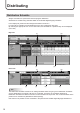


Table Of Contents

16
Distribution Schedule
Assigns a schedule to a panel and reserves program distribution.
Schedules are created using Schedule Editor of the SHARP Digital Signage Software.
In the display list, panels and their assigned schedules are shown.
For each day, the details of the timetable set for the day is displayed. (day view)
By selecting an appropriate icon on the view toolbar, the timetable for a particular day can be displayed.
(hour view)
Day view
(1) (2)
(3) (4) (5)
Hour view
(1) (2)
(3) (4) (7)(6)
TIPS
The Distribution Schedule function is for setting schedules which are going to be distributed. Schedules
arenotdistributedtothepanelsuntiltheyareconrmed.Therefore,theschedulesdisplayedin
Distribution Schedule are different from the current schedules of the panels. The current schedules of the
panels can be viewed from [Distribution Status (Panel)].
Note that it is not possible to view schedules in the past with the SHARP Digital Signage Software Pro.
Distributing