
Operation Manual
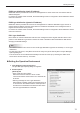

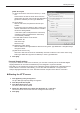

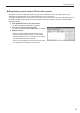

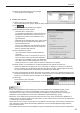

Table Of Contents

15
Installing/Launching
Registering a panel (viewer PC) for data request
The panels used with PUSH type distribution (dynamic IP address) or PULL type distribution can be
registered (accepted) based on the setting details sent from the viewer PC.
The setting information of the viewer PC can be sent from the “FTP Server” tab in the setting dialog box of
the SHARP Digital Signage Software Client Scheduler. (Read the operation manual for SHARP Digital
Signage Software.)
Click [Add/Edit Panel] in the [Tools] menu.1.
The [Panel Management] dialog box appears.
2. Click [List of panels requesting data].
The [List of panels requesting data] dialog box appears.
Register a panel.3.
When you click [Register Panels One By One], a •
dialog for adding a panel appears for each of the
selected panels one by one, allowing you to register
the panel while checking the details.
When you click [Register All Panels], all new panels •
are registered to the selected group at once.